

Close Menu
  • Latest
  • Help Support Independent Journalism
  • Features
  • Hubs
    • Summer Game Fest 2025
    • CES 2026
  • Gaming
    • All Gaming
    • Nintendo
    • PlayStation
    • Xbox
    • PC Gaming
    • Hardware News
    • VR
  • Guides
  • Entertainment
    • All Entertainment
    • Anime & Animation
    • Movies and TV
    • Books
    • Manga & Comics
    • Toys
    • Geek
    • Pop Culture
  • Previews
  • Reviews
    • All Reviews
    • Video Game
    • Anime & Animation
    • Movie & TV
    • Comic Book & Manga
    • Tech & Gear
    • Food
    • Book
    • Toys
    • Tabletop and Card Game
  • Podcasts
    • A-01 Podcast
    • Nintendo Entertainment Podcast
    • Spectator Mode Podcast
  • Contact Us
X (Twitter) YouTube RSS Bluesky Discord

Follow Us

X (Twitter) Instagram YouTube Bluesky Discord
The OuterhavenThe Outerhaven
  • Latest
  • Features
  • Guides
  • Hubs
    • Summer Game Fest 2025
    • CES 2026
  • Previews
  • Reviews
    • Video Game Reviews
    • Anime & Animation Reviews
    • Comic Book & Manga Reviews
    • Films & TV Reviews
    • Hardware Reviews
    • Tabletop & Card Game Reviews
    • Toy Reviews
  • Gaming
    • PlayStation
    • Nintendo
    • Xbox
    • PC Gaming
    • Tabletop & Card Game
    • Hardware News
    • Virtual Reality
  • Entertainment
    • Anime & Animation
    • Comic Books & Manga
    • Films & TV
    • Original English Light Novels DB
    • OELN DB
    • Pop Culture
    • Books
    • Toys
  • Podcasts
    • A-01 Podcast
    • Nintendo Entertainment Podcast
    • Spectator Mode Podcast
The OuterhavenThe Outerhaven
Home»News»Hardware News»How To Fix The Division 2 No Audio Bug For Logitech Headsets

How To Fix The Division 2 No Audio Bug For Logitech Headsets

By Keith MitchellMarch 18, 2019
division 2 logo

Having audio issues in The Division 2?

So you’re about to jump into a game of The Division 2. You fire up the game, get all excited and put your Logitech headset on and then you realize you have no sound. You tab out, and the sound comes back. But the second you go back to the game, it’s gone again. What’s going on?
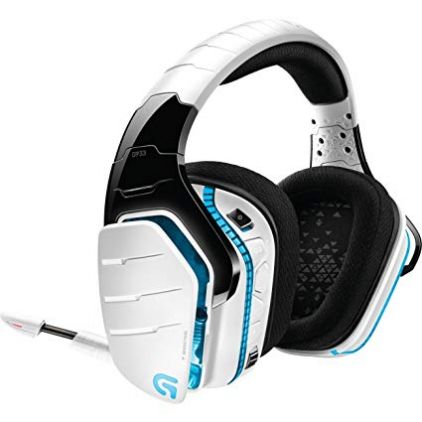
Logitech G933 Artemis Snow Spectrum

Well, turns out there’s a bug for anyone who is running any of Logitech’s gaming headsets and the Logitech Gaming Software. So far the following headsets are affected:

  • G533 Wireless Gaming Headset
  • G633 Artemis Spectrum RGB 7.1 Surround Gaming Headset
  • G933 Artemis Spectrum Snow Wireless 7.1 Gaming Headset

These are the headsets I was able to reproduce the error on, however, it may also affect any headsets that require the Logitech Gaming Software.

So how do we fix this no audio issue?

There are two ways to fix this. The first way is to kill the Logitech Registry Service executable (LogiRegistryService.exe). To this, open up the task manager in Windows 8 or Windows 10, and search for LogiRegistryService.exe and kill it by right-clicking and ending the task.

Doing this will return the audio when you tab back into the game.

Or you can simply close down the Logitech Gaming Software. 

The downside to either of these is that you’ll lose access to any surround sound functionality. Should you close down the software completely, you’ll also lose the ability to check the headsets battery life, mouse tweaks, and other access that your Logitech devices require. You can restart the software, however, after you’re done gaming.

An added bonus is that stopping either of these also provides a little bit of framerate bump for the title and it removed the clicking noises I randomly received as well.

I would just kill the LogiRegistryService.exe and leave the rest alone. If you want to start that surround sound service again, you just need to start the file found at “C:\Program Files\Logitech Gaming Software\Drivers\APOService\LogiRegistryService.exe”

We’ve contacted both Ubisoft and Logitech with our findings. Hopefully, they’ll provide a fix for this soon. Until then, use this fix to get you back into the action, agent.

G533 G633 G933 Logitech No audio bug The Division 2
Keith Mitchell - Headshot-PS_Gear_400x400
Keith Mitchell
  • X (Twitter)
  • LinkedIn

Keith D. Mitchell is the Founder and Editor-in-Chief of The Outerhaven, covering games and tech for over 14 years. A lifelong PC gamer who began building PCs at age eight, he is a hardware enthusiast, Soulslike devotee, and regular attendee of major gaming and technology events.

Latest Articles

Embark Studios Is Encouraging Cooperation in ARC Raiders With New Shared Watch Event

February 9, 2026

Sony Confirms February 12, 2026 PlayStation State of Play, Promises 60+ Minutes

February 9, 2026

Ride 6 Review – Two Wheels, Endless Passion

February 9, 2026

Editorial: PC Gaming Is Getting Too Expensive, Is the Cloud the Only Way Left?

February 8, 2026

Latest Windows 11 Update KB5074109 Causes Nvidia GPU Performance Drops

February 8, 2026

Manga Review: Mad Miniscape Vol. 1

February 8, 2026
About Us • Our Team • Contact Us • Privacy Policy • Review Policy
Ethics Policy • Terms of Service • Fact Checking & Corrections Policy • Editorial Policy

Find our reviews on Metacritic • OpenCritic • CriticDB
Copyright @2026 The Outerhaven Productions

Type above and press Enter to search. Press Esc to cancel.