Close Menu
  • Latest
  • Help Support Independent Journalism
  • Features
  • Gaming
    • All Gaming
    • Nintendo
    • PlayStation
    • Xbox
    • PC Gaming
    • VR
  • Guides
  • Entertainment
    • All Entertainment
    • Anime & Animation
    • Movies and TV
    • Books
    • Manga & Comics
    • Toys
    • Geek
    • Pop Culture
  • Previews
  • Reviews
    • All Reviews
    • Video Game
    • Anime & Animation
    • Movie & TV
    • Comic Book & Manga
    • Tech & Gear
    • Food
    • Book
    • Toys
    • Tabletop and Card Game
  • Podcasts
    • A-01 Podcast
    • Nintendo Entertainment Podcast
    • Spectator Mode Podcast
  • Contact Us
X (Twitter) YouTube RSS Bluesky Discord

Follow Us

X (Twitter) Instagram YouTube Bluesky Discord
The OuterhavenThe Outerhaven
  • Latest
  • Features
  • Guides
  • Previews
  • Reviews
    • Video Game Reviews
    • Anime & Animation Reviews
    • Comic Book & Manga Reviews
    • Films & TV Reviews
    • Tech Reviews
    • Tabletop & Card Game Reviews
    • Toy Reviews
  • Gaming
    • PlayStation
    • Nintendo
    • Xbox
    • PC Gaming
    • Tabletop & Card Game
    • Virtual Reality
  • Entertainment
    • Anime & Animation
    • Comic Books & Manga
    • Films & TV
    • Original English Light Novels DB
    • OELN DB
    • Pop Culture
    • Books
    • Toys
  • Tech News
  • Podcasts
    • A-01 Podcast
    • Nintendo Entertainment Podcast
    • Spectator Mode Podcast
The OuterhavenThe Outerhaven

No Rest For The Wicked: How to Enable PlayStation Controller Support

By Ali HashmiApril 19, 2024

No Rest for the Wicked is out now in early access on Steam, and it’s off to a decent start despite some technical issues holding it back. The PC release has controller support, but it’s not perfect and doesn’t have native support for PlayStation controllers, such as the DualShock 3, DualShock 4, or DualSense. If you can’t get these to work with No Rest for the Wicked, this guide will walk you through the simple fixes to address the lack of native support.

How to Enable Steam Input Support

To ensure your non-Xbox controllers work with No Rest for the Wicked, you need to enable Steam Input.

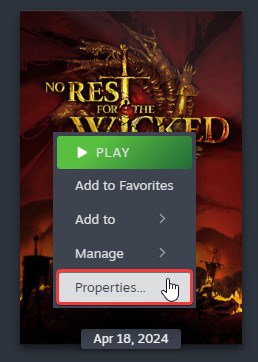
  • Right-click on No Rest for the Wicked in your library
  • Select Properties

no rest for the wicked Enable Steam Input Support 1

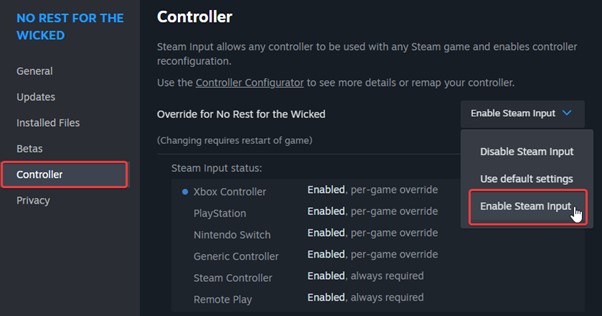
  • Now, open the Controller tab, and make sure Enable Steam Input is selected in the dropdownno rest for the wicked Enable Steam Input Support 2

For most users, this should fix the problem, and you’ll be able to use your Dualshock 4 or Dualsense in-game. If that doesn’t work, you need to ensure that PlayStation support is enabled in Steam’s global settings.

Enable PlayStation Controller Support in Steam Settings

To make sure this option is checked, follow the steps below.
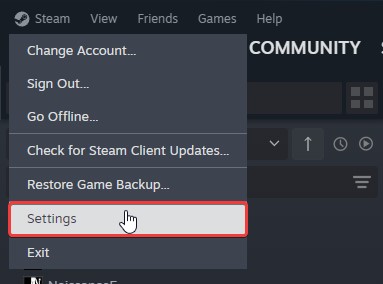
no rest for the wicked Enable Steam Input Support 3

  • In the Steam client, click on the Steam option at the top left, and select Settings
  • Here, select the Controller tab, and scroll down till you come across PlayStation Controller Support
  • Make sure to select the “Enabled in Games w/o Support” option
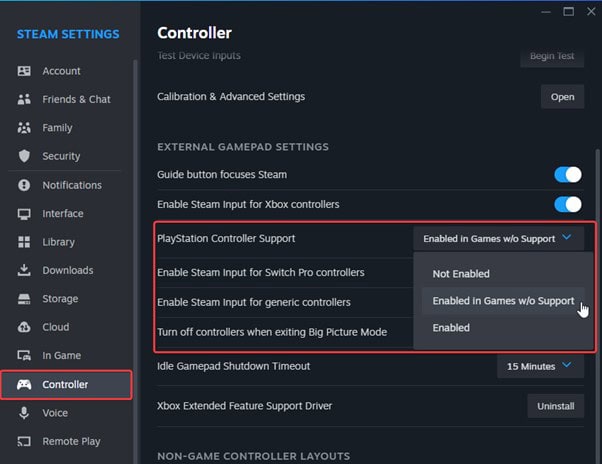
no rest for the wicked Enable Steam Input Support 4

After this, the Steam Input API will take over your controller settings, and your PlayStation controllers will function normally. Just keep in mind that you’ll have to get used to seeing Xbox prompts because the game doesn’t have PlayStation prompts at all.
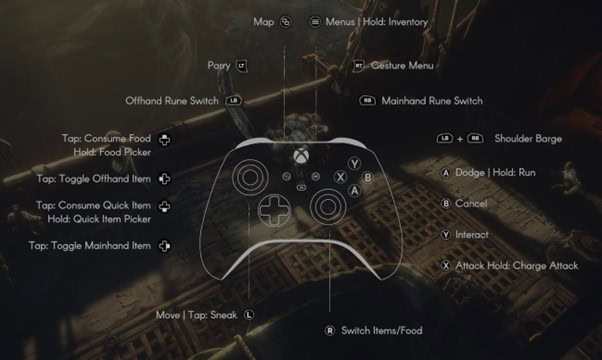
no rest for the wicked Enable Steam Input Support 5

Disable Controller Vibration

If you’re annoyed by the game’s vibration effects, you can lower the intensity to zero percent. This works independently of Steam Input and with whatever controller you currently have plugged in.

It is the second option in the General Settings.
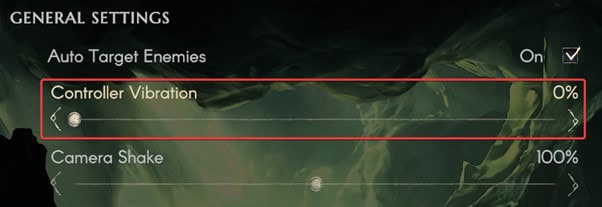
no rest for the wicked Enable Steam Input Support 6

We hope that the developers eventually add native support for PlayStation controllers including the dedicated button prompts. The Ori games didn’t have proper prompts either, but modern releases should have proper visual indicators for correct controller types. Even a simple Type A or Type B option would suffice if native profiles aren’t a priority at the moment.

We hope this guide was helpful! If you have any questions, make sure to leave those below, and stay tuned for our coverage of No Rest for the Wicked.


Dual Shock DualSense Guide No Rest for the Wicked
Ali Hashmi
Ali Hashmi
  • Website
  • X (Twitter)

Gaming enthusiast, massive soulsborne fan, and a passionate writer. Always on the lookout for interesting games with unique mechanics and design. He loves to write informative guides for newer and ongoing releases.

Latest Articles

Cronos: The New Dawn Is Getting an Easy Mode in Early 2026

December 22, 2025

Pragmata Preview: Hands-On Hacking with the Sketchbook Demo

December 22, 2025

Gachiakuta Gets 2nd TV Anime Season And Video Game

December 21, 2025

Chainsaw Man TV Anime Reveals Assassins Arc

December 21, 2025

Black Clover Season Two Gets 2026 Release And Promotional Video

December 21, 2025

A Wild Last Boss Appeared! TV Anime Gets 2nd Season

December 21, 2025
About Us • Our Team • Contact Us • Privacy Policy • Review Policy
Ethics Policy • Terms of Service • Metacritic • OpenCritic • CriticDB
Ownership & Funding Disclosure • Fact Checking & Corrections Policy • Editorial Policy
Copyright @2025 The Outerhaven Productions

Type above and press Enter to search. Press Esc to cancel.