

Close Menu
  • Latest
  • Help Support Independent Journalism
  • Features
  • Hubs
    • Summer Game Fest 2025
    • CES 2026
  • Gaming
    • All Gaming
    • Nintendo
    • PlayStation
    • Xbox
    • PC Gaming
    • Hardware News
    • VR
  • Guides
  • Entertainment
    • All Entertainment
    • Anime & Animation
    • Movies and TV
    • Books
    • Manga & Comics
    • Toys
    • Geek
    • Pop Culture
  • Previews
  • Reviews
    • All Reviews
    • Video Game
    • Anime & Animation
    • Movie & TV
    • Comic Book & Manga
    • Tech & Gear
    • Food
    • Book
    • Toys
    • Tabletop and Card Game
  • Podcasts
    • A-01 Podcast
    • Nintendo Entertainment Podcast
    • Spectator Mode Podcast
  • Contact Us
X (Twitter) YouTube RSS Bluesky Discord

Follow Us

X (Twitter) Instagram YouTube Bluesky Discord
The OuterhavenThe Outerhaven
  • Latest
  • Features
  • Guides
  • Hubs
    • Summer Game Fest 2025
    • CES 2026
  • Previews
  • Reviews
    • Video Game Reviews
    • Anime & Animation Reviews
    • Comic Book & Manga Reviews
    • Films & TV Reviews
    • Hardware Reviews
    • Tabletop & Card Game Reviews
    • Toy Reviews
  • Gaming
    • PlayStation
    • Nintendo
    • Xbox
    • PC Gaming
    • Tabletop & Card Game
    • Hardware News
    • Virtual Reality
  • Entertainment
    • Anime & Animation
    • Comic Books & Manga
    • Films & TV
    • Original English Light Novels DB
    • OELN DB
    • Pop Culture
    • Books
    • Toys
  • Podcasts
    • A-01 Podcast
    • Nintendo Entertainment Podcast
    • Spectator Mode Podcast
The OuterhavenThe Outerhaven
Home»News»Gaming News»Fixing The Stutter Issue In Resident Evil 2 For Nvidia GTX Video Cards

Fixing The Stutter Issue In Resident Evil 2 For Nvidia GTX Video Cards

By Keith MitchellFebruary 6, 2019
Resident Evil 2

As much as I enjoyed Capcom’s Resident Evil 2 Remake on PC, I have to admit the experience hasn’t been a perfect one.

Not due to the game, but due to the stuttering, I experienced whenever the game transited to a new area. Or when multiple enemies were rendered in specific areas. We’re talking stuttering that dropped my framerate from 60FPS, all the way down to 30FPS at times. Not only did it affect the atmosphere of the game, but it also caused me to get hit by several enemies – including T-103 Tyrant/Mr. X.

Thankfully, after some tinkering, I figured out the cause and a fix to my issue. Granted, as with most technology guides, your experience may vary. That said, these are the steps I took to reduce/remove the stuttering that plagued my Resident Evil 2 Remake experience on multiple PCs, equipped with AMD Ryzen CPUs and Nvidia GTX 10xx GPUs. For those wondering, my setup consisted of AMD’d Ryzen 1700 & 1800X CPU, as well as the Nvidia GTX 1080 Ti and GTX 1060. I was also running with G-Sync, but that didn’t help my issues at all. I haven’t tested this with Nvidia’s RTX cards since I don’t have access to any. However, this fix should also apply to them as well.

Hopefully, this helps anyone who is also encountering this issue with the game.

How to fix the stuttering

1. Download and install Rivatuner Statistic Server or commonly referred to as RTSS. 

2. Once installed, start up RivaTuner and locate the Framerate limit. Set this to 30 or 60. This number depends on the resolution and hardware you are running. For example, if you’re using a GTX 1060 or above, you’ll be able to play the game at 1080p and 1440p at 60FPS. At 4K (3840/2160p), you may want to cap this at 30FPS.

3. Make sure the application detection level is set to low, medium or high. This allows RivaTuner to be seen by the game’s executable.
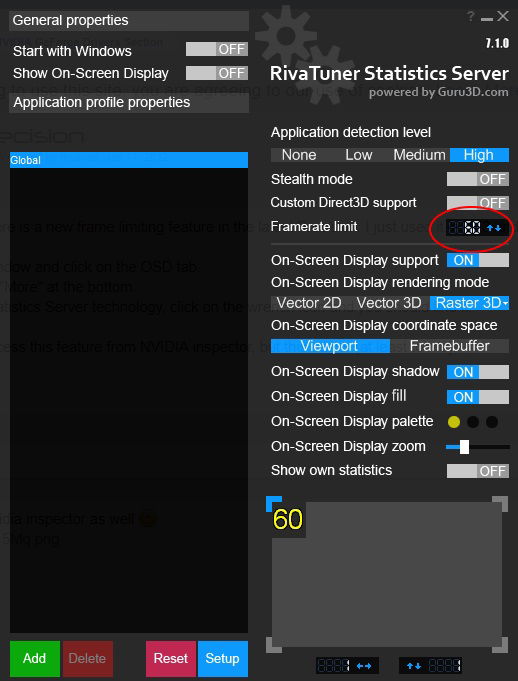
rivaturner-cap-60fps

4. Fire up Resident Evil 2 and go to options and then graphics.

5. Change the Framerate to 30 or 60 and make sure that V-Sync is enabled. Do not select the variable framerate option.

6. Save the changes and that’s it.

As you can see in the video below, my framerate barely drops below 60FPS. Prior to the changes, the framerate was all over the place. This occurred regardless if I played at 1080p, 1440p or 4K. Now, it’s much better. Hopefully, this fixes your issues and you’ll experience a stutter-free Resident Evil 2 experience.

If you encounter any issues or have questions, leave us a comment.

capcom GTX 10xx Guide How to MS Afterburner nvidia Precision X Resident Evil 2 RivaTuner RTX 20xx Stutter
Keith Mitchell - Headshot-PS_Gear_400x400
Keith Mitchell
  • X (Twitter)
  • LinkedIn

Keith D. Mitchell is the Founder and Editor-in-Chief of The Outerhaven, covering games and tech for over 14 years. A lifelong PC gamer who began building PCs at age eight, he is a hardware enthusiast, Soulslike devotee, and regular attendee of major gaming and technology events.

Latest Articles

Wizards of the Coast is debuting a new card game at MagicCon – and it’s not Magic

February 5, 2026

Manta Has Eight Recommendations for You for This Valentine’s Day

February 4, 2026

Rooster Fighter Comes to Adult Swim

February 4, 2026

Cö shu Nie Drops New Single “Hollow” feat. Zach Danziger

February 4, 2026

Wings Of Bluestar Pre-orders Are Live By VGNYSoft Games

February 4, 2026

Sleeping Gods: Distant Skies Review – Soaring Through a Living World of Wonder and Peril

February 4, 2026
About Us • Our Team • Contact Us • Privacy Policy • Review Policy
Ethics Policy • Terms of Service • Metacritic • OpenCritic • CriticDB
Ownership & Funding Disclosure • Fact Checking & Corrections Policy • Editorial Policy
Copyright @2026 The Outerhaven Productions

Type above and press Enter to search. Press Esc to cancel.