


Close Menu
  • News
  • Features
  • Guides
  • Interviews
  • Reviews
  • Previews
  • About Us
  • Metacritic
  • OpenCritic
  • CriticDB
X (Twitter) YouTube RSS Bluesky Discord

Follow Us

Facebook X (Twitter) YouTube Bluesky
The OuterhavenThe Outerhaven
  • Latest
  • Features
  • Guides
  • Hubs
    • Summer Game Fest 2025
    • CES 2026
  • Previews
  • Reviews
    • Video Game Reviews
    • Anime & Animation Reviews
    • Comic Book & Manga Reviews
    • Films & TV Reviews
    • Hardware Reviews
    • Tabletop & Card Game Reviews
    • Toy Reviews
  • Gaming
    • PlayStation
    • Nintendo
    • Xbox
    • PC Gaming
    • Tabletop & Card Game
    • Hardware News
    • Virtual Reality
  • Entertainment
    • Anime & Animation
    • Comic Books & Manga
    • Films & TV
    • Original English Light Novels DB
    • OELN DB
    • Pop Culture
    • Books
    • Toys
  • Podcasts
    • A-01 Podcast
    • Nintendo Entertainment Podcast
    • Spectator Mode Podcast
The OuterhavenThe Outerhaven
Home»News»Gaming News»Possible Solution for Your Path of Exile 2 Input Delay Woes

Possible Solution for Your Path of Exile 2 Input Delay Woes

By Keith MitchellDecember 10, 2024
path of exile 2 logo

While playing Path of Exile 2, you might experience input delay, whether you’re on PC or console, and regardless of whether you’re using a keyboard and mouse or a controller. Fortunately, one common cause of this issue has a simple fix. In this guide, we’ll walk you through how to address it.

Addressing Path of Exile 2 Input Delay

When you first start Path of Exile 2, you’ll notice that the Gateway is set to “Auto-select Gateway.” This option automatically connects you to the server closest to your geolocation, aiming to provide the best performance. However, we’ve observed that this feature doesn’t always work as intended and may cause input delays, regardless of whether you’re playing on PlayStation 5, Xbox Series X|S, or PC. To avoid this issue, you can disable the auto-select feature and manually choose a server closer to your location.

In these screenshots, we are using the PC version of the game. However, the process should be similar for the console versions.

To change the Auto-select Gateway on PC, simply click the drop-down box next to “Gateway” and select your preferred server.
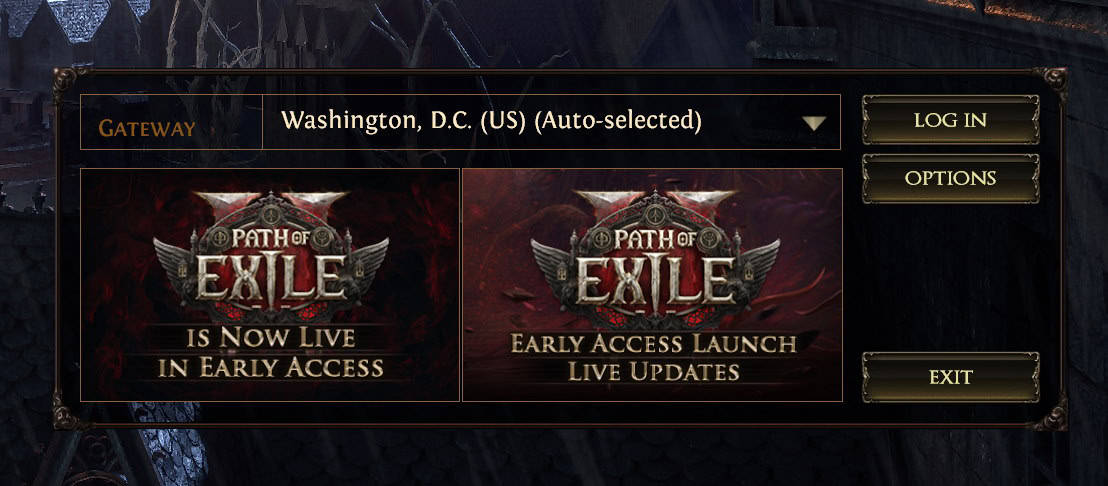
Path of Exile 2 - What to do about input delay guide-01

When you do this, you’ll see a list of servers appear, each with a number next to it. This number represents the time, in milliseconds (ping), it takes for the Path of Exile 2 client to communicate with that server. The lower the ping, the better the connection.

You can still play on a server with a ping of 100 or slightly higher, especially if you’re playing with friends. However, for the best experience, most players will prefer to choose the server with the lowest ping. Unfortunately, the auto-select feature doesn’t always pick the optimal server. For this reason, I prefer to manually select a server close to my location rather than relying on auto-selection.
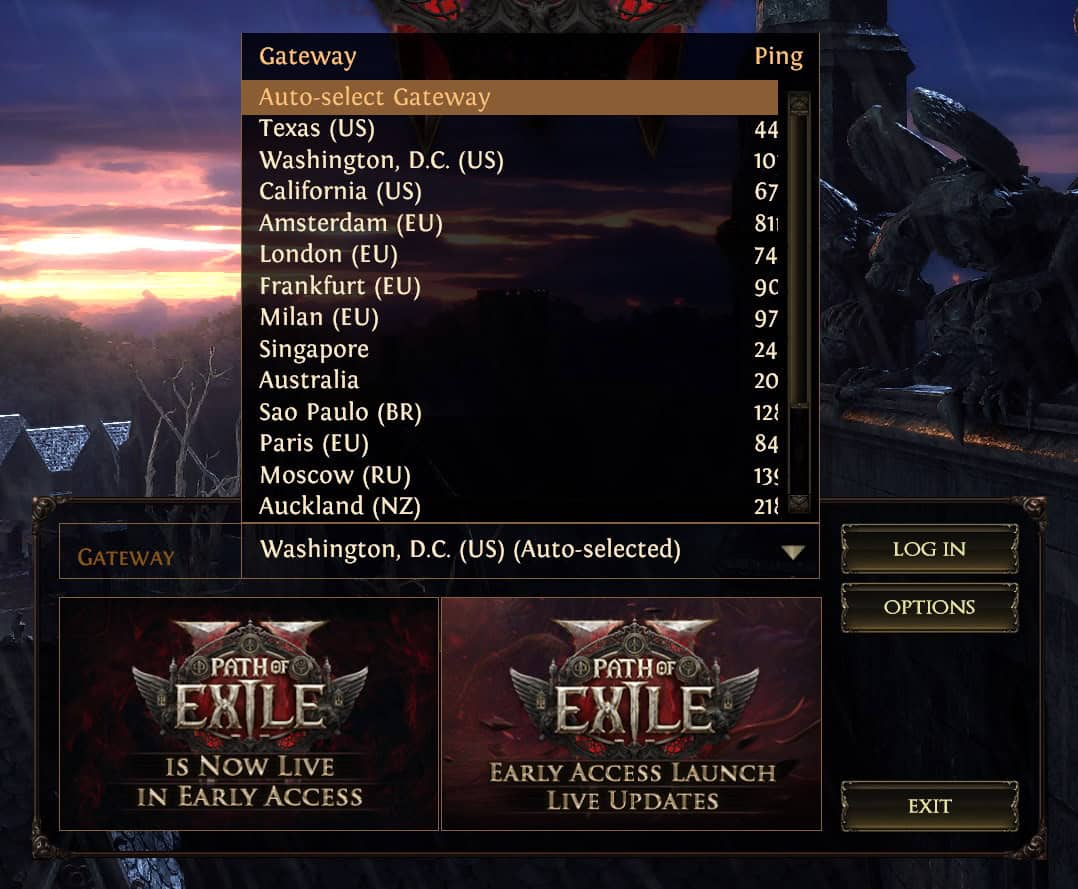
Path of Exile 2 - What to do about input delay guide-02

So, if you’re experiencing input delay, try this—it might be the solution to your problem.

action rpgs Guide input delay Path of Exile 2
Keith Mitchell - Headshot-PS_Gear_400x400
Keith Mitchell
  • X (Twitter)
  • LinkedIn

Keith D. Mitchell is the Founder and Editor-in-Chief of The Outerhaven, covering games and tech for over 14 years. A lifelong PC gamer who began building PCs at age eight, he is a hardware enthusiast, Soulslike devotee, and regular attendee of major gaming and technology events.

Latest Articles

ONE PIECE Returns to Crunchyroll on April 5

February 17, 2026

WEBTOON Champions Creators and the Future of Comics at Emerald City Comic Con 2026

February 17, 2026

Boruto Receives 24/7 Channel for FREE on Pluto TV

February 17, 2026

First RPG Maker Awards Announces Winners

February 17, 2026

WWE 2K26 Details Universe Mode & Creations

February 17, 2026

Why I Love .hack: A Series About Humanity and Identity

February 17, 2026
About Us • Our Team • Contact Us • Privacy Policy • Review Policy
Ethics Policy • Terms of Service • Fact Checking & Corrections Policy • Editorial Policy

Find our reviews on Metacritic • OpenCritic • CriticDB
Copyright @2026 The Outerhaven Productions

Type above and press Enter to search. Press Esc to cancel.