Close Menu
  • Latest
  • Help Support Independent Journalism
  • Features
  • Hubs
    • Summer Game Fest 2025
    • CES 2026
  • Gaming
    • All Gaming
    • Nintendo
    • PlayStation
    • Xbox
    • PC Gaming
    • Hardware News
    • VR
  • Guides
  • Entertainment
    • All Entertainment
    • Anime & Animation
    • Movies and TV
    • Books
    • Manga & Comics
    • Toys
    • Geek
    • Pop Culture
  • Previews
  • Reviews
    • All Reviews
    • Video Game
    • Anime & Animation
    • Movie & TV
    • Comic Book & Manga
    • Tech & Gear
    • Food
    • Book
    • Toys
    • Tabletop and Card Game
  • Podcasts
    • A-01 Podcast
    • Nintendo Entertainment Podcast
    • Spectator Mode Podcast
  • Contact Us
X (Twitter) YouTube RSS Bluesky Discord

Follow Us

X (Twitter) Instagram YouTube Bluesky Discord
The OuterhavenThe Outerhaven
  • Latest
  • Features
  • Guides
  • Hubs
    • Summer Game Fest 2025
    • CES 2026
  • Previews
  • Reviews
    • Video Game Reviews
    • Anime & Animation Reviews
    • Comic Book & Manga Reviews
    • Films & TV Reviews
    • Hardware Reviews
    • Tabletop & Card Game Reviews
    • Toy Reviews
  • Gaming
    • PlayStation
    • Nintendo
    • Xbox
    • PC Gaming
    • Tabletop & Card Game
    • Hardware News
    • Virtual Reality
  • Entertainment
    • Anime & Animation
    • Comic Books & Manga
    • Films & TV
    • Original English Light Novels DB
    • OELN DB
    • Pop Culture
    • Books
    • Toys
  • Podcasts
    • A-01 Podcast
    • Nintendo Entertainment Podcast
    • Spectator Mode Podcast
The OuterhavenThe Outerhaven
Home»News»Gaming News»Here’s how you can play River City Girls 2 at 60FPS on PC

Here’s how you can play River City Girls 2 at 60FPS on PC

By Keith MitchellDecember 16, 2022
River City Girls 2

When River City Girls 2 was first released, a glitch caused the game to run at 30FPS.  Of course, this frustrated a number of fans who were looking forward to the game. Thankfully, a new beta for the PC has been released that allows the PC to run at the correct framerate.

You can see this in action by watching the video below.

How to play River City Girls 2 at 60FPS on PC

To implement the beta update that unlocks the 60FPS, you have to do the following;

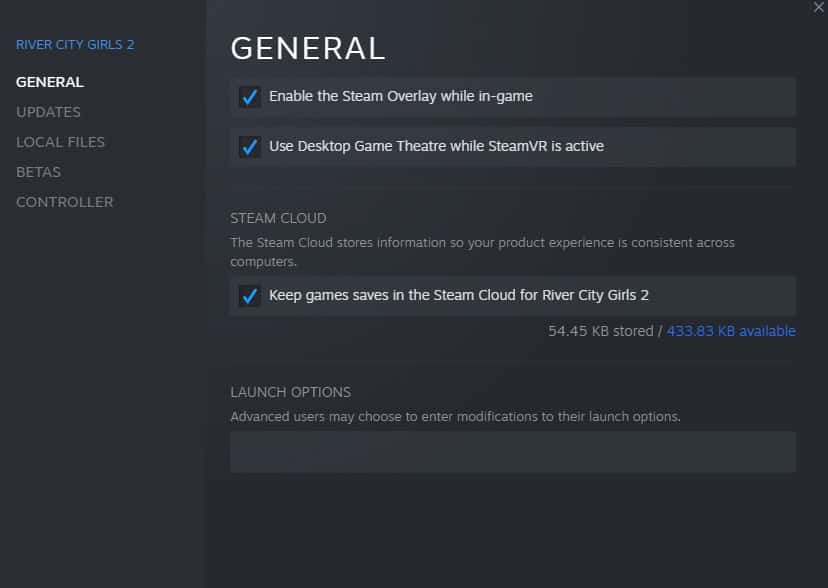
  • Open Steam and right-click on River City Girls 2, and click on properties.
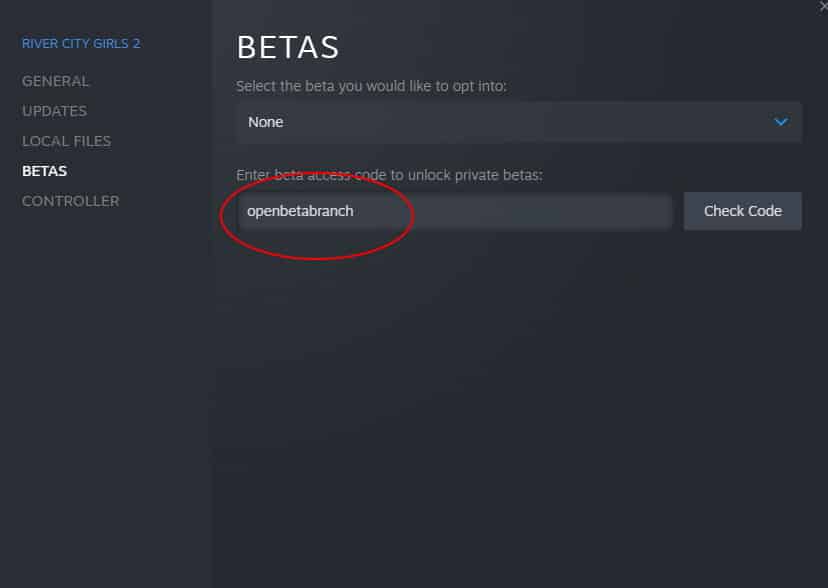
  • Click on “BETAS.”

  • Enter “openbetabranch.”

  • “Opt into: openbetabranch – Open Beta Branch” will appear.
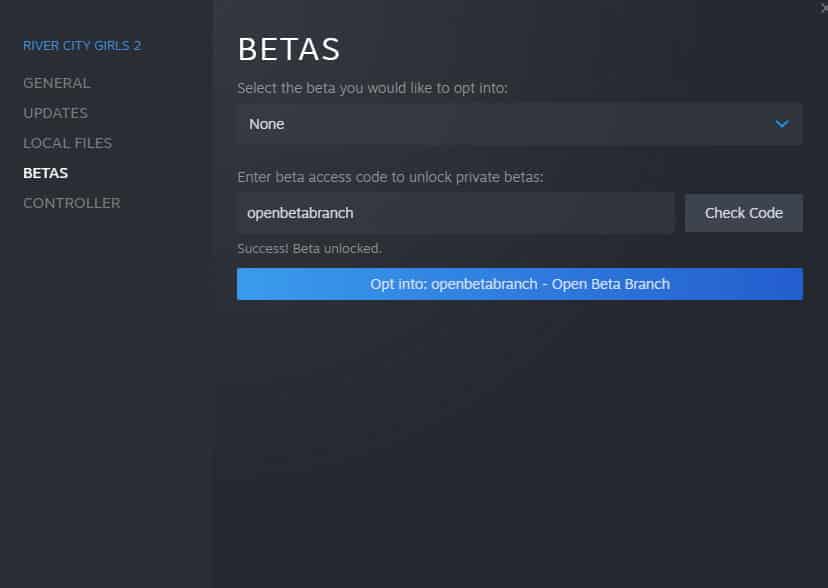
  • Click on Select the beta you would like to opt into,” and click on “None.” A new option will appear.  Select “Opt into: openbetabranch – Open Beta Branch.”
  • After doing this, a new update, “openbetabranch – Open Beta Branch,” will appear. Select this. This will prompt the game to download an 850MB update.
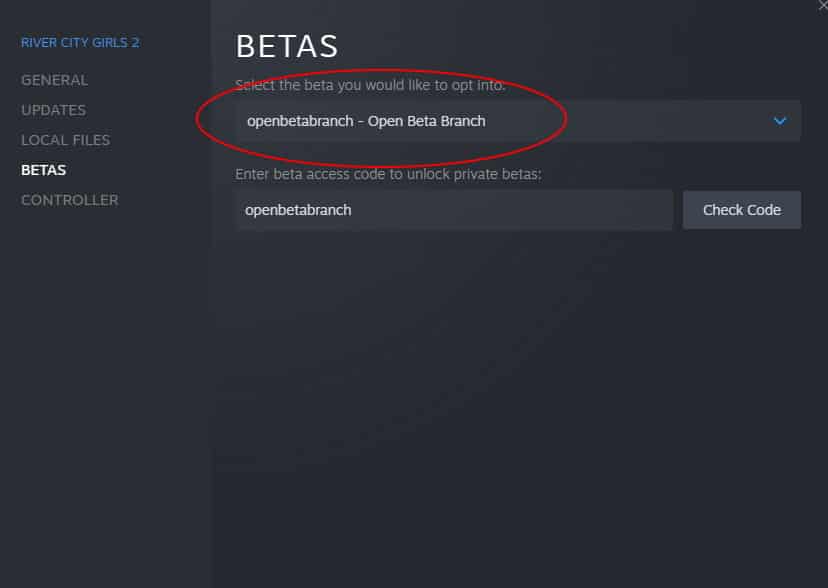
After doing this, fire up River City Girls 2, and the game will play at 60 frames per second!

60fps fix PC River City Girls 2 update
Keith Mitchell - Headshot-PS_Gear_400x400
Keith Mitchell
  • X (Twitter)
  • LinkedIn

Keith D. Mitchell is the Founder and Editor-in-Chief of The Outerhaven, covering games and tech for over 14 years. A lifelong PC gamer who began building PCs at age eight, he is a hardware enthusiast, Soulslike devotee, and regular attendee of major gaming and technology events.

Latest Articles

Resident Evil Requiem Reveals Grace Ashcroft and Leon S. Kennedy Amiibo

February 5, 2026

Highguard Review – Promising But Nowhere Near The Apex Of The Genre

February 5, 2026

Wizards of the Coast is debuting a new card game at MagicCon – and it’s not Magic

February 5, 2026

Manta Has Eight Recommendations for You for This Valentine’s Day

February 4, 2026

Rooster Fighter Comes to Adult Swim

February 4, 2026

Cö shu Nie Drops New Single “Hollow” feat. Zach Danziger

February 4, 2026
About Us • Our Team • Contact Us • Privacy Policy • Review Policy
Ethics Policy • Terms of Service • Metacritic • OpenCritic • CriticDB
Ownership & Funding Disclosure • Fact Checking & Corrections Policy • Editorial Policy
Copyright @2026 The Outerhaven Productions

Type above and press Enter to search. Press Esc to cancel.