

Close Menu
  • Latest
  • Help Support Independent Journalism
  • Features
  • Gaming
    • All Gaming
    • Nintendo
    • PlayStation
    • Xbox
    • PC Gaming
    • Card & Tabletop
    • VR
  • Guides
  • Entertainment
    • All Entertainment
    • Anime & Animation
    • Movies and TV
    • Books
    • Manga & Comics
    • Toys
    • Geek
    • Culture
  • Previews
  • Reviews
    • All Reviews
    • Video Game
    • Anime & Animation
    • Movie & TV
    • Comic Book & Manga
    • Tech & Gear
    • Food
    • Book
    • Toys
    • Tabletop and Card Game
  • Podcasts
    • A-01 Podcast
    • Nintendo Entertainment Podcast
    • Spectator Mode Podcast
  • Contact Us
X (Twitter) YouTube RSS Bluesky Discord

Follow Us

X (Twitter) Instagram YouTube Bluesky Discord
The OuterhavenThe Outerhaven
  • Latest
  • Features
  • Guides
  • Previews
  • Reviews
    • Video Game Reviews
    • Anime & Animation Reviews
    • Comic Book & Manga Reviews
    • Films & TV Reviews
    • Tech Reviews
    • Tabletop and Card Game Reviews
    • Toy Reviews
  • Gaming
    • PlayStation
    • Nintendo
    • Xbox
    • PC Gaming
    • Retro Gaming
    • Tabletop
    • Virtual Reality
  • Entertainment
    • Anime & Animation
    • Comic Books & Manga
    • Films & TV
    • Original English Light Novels DB
    • OELN DB
    • Culture
    • Books
    • Toys
  • Tech
  • Podcasts
    • A-01 Podcast
    • Nintendo Entertainment Podcast
    • Spectator Mode Podcast
The OuterhavenThe Outerhaven
Home»News»Gaming News»How to reset Diablo 4 Dungeons

How to reset Diablo 4 Dungeons

By Keith MitchellMarch 19, 2023
Diablo 4 Logo

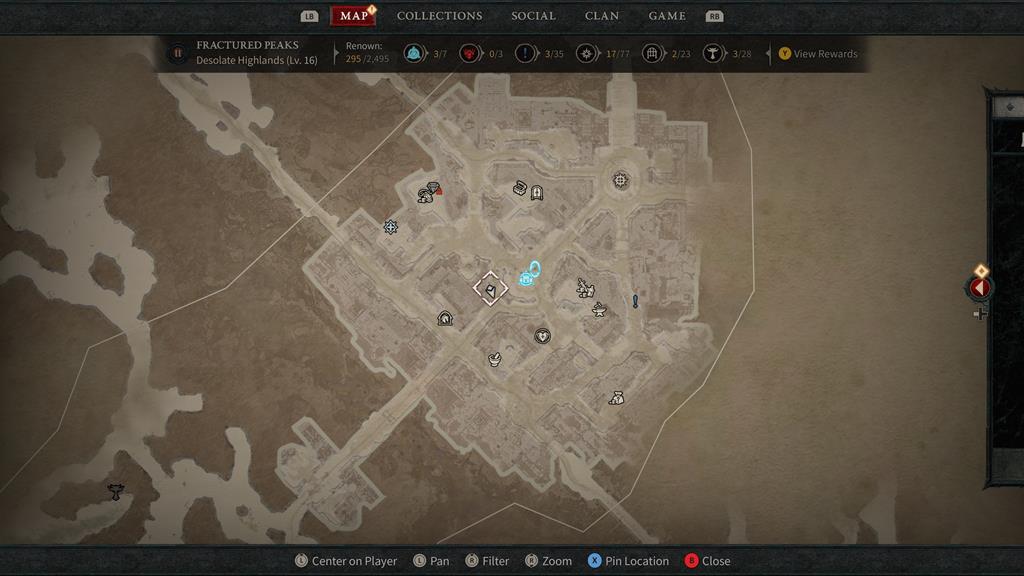
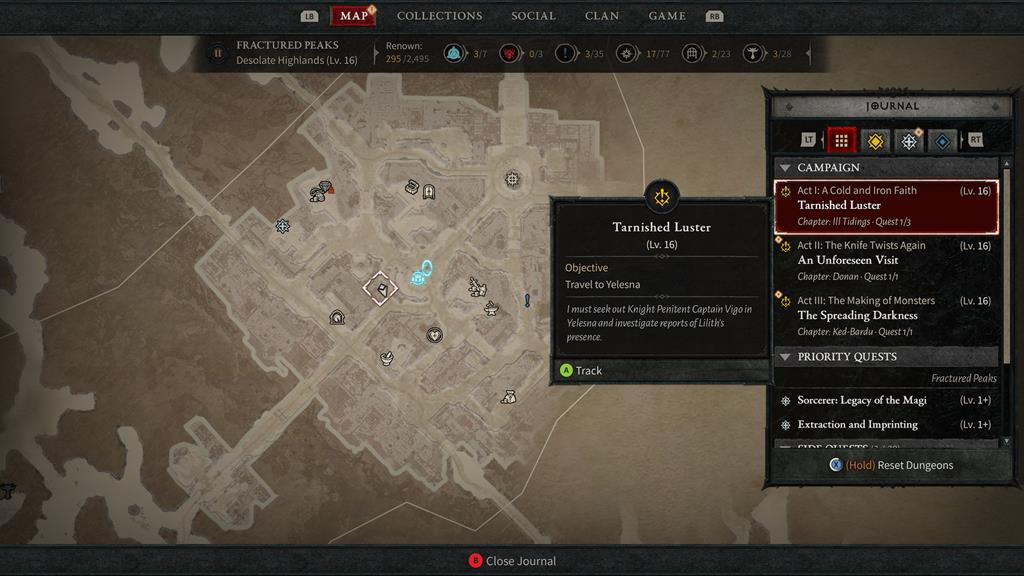
The dungeons in the Diablo 4 beta are damned fun if I say so myself. However, after running through a few, I wanted to go back and do them again. Maybe a boss kicked my butt more than I wanted, or if I wanted to find find more loot. Either way, it’s pretty simple to reset the dungeons in Diablo 4. All you have to do is access the map, and once you do that, you should see a tab on the right-hand side of the screen. This opens up the journal. At the bottom of the journal is an option to “Reset Dungeons.”

Clicking on this or holding down the indicated button if you’re using a controller will ask if you want to reset the dungeons.
How to reset Diablo 4 Dungeons1

How to reset Diablo 4 Dungeons2

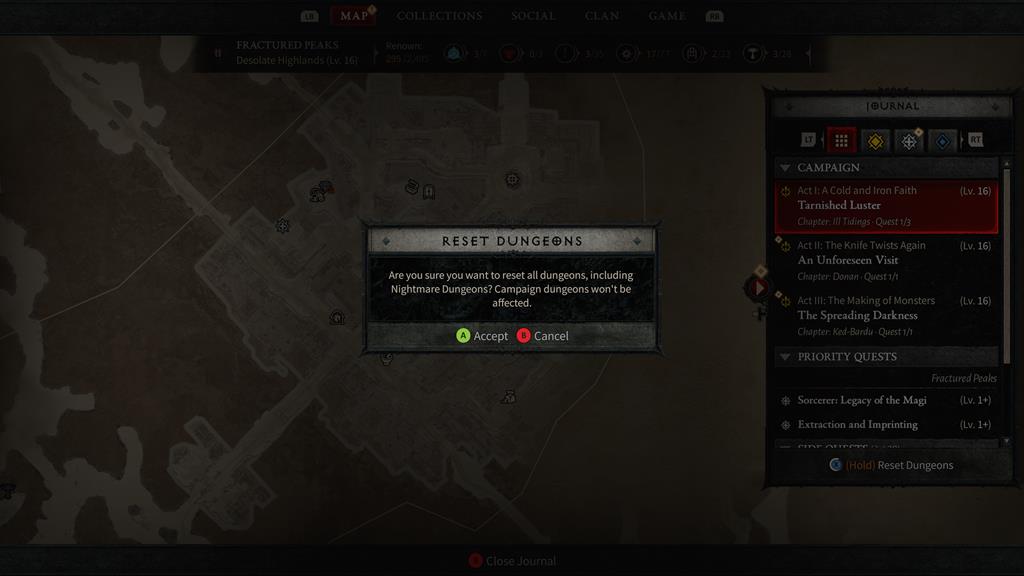
Clicking on this or holding down the indicated button if you’re using a controller will ask if you want to reset the dungeons. If you accept, all of the dungeons, with the exception of the campaign /story dungeons, will be reset.
How to reset Diablo 4 Dungeons3

The Diablo 4 release date is June 6, 2023, for the PS4, PS5, Xbox One, Xbox Series X|S, and PC.

blizzard Diablo 4 Diablo IV Guide
Keith Mitchell - Headshot-PS_Gear_400x400
Keith Mitchell
  • X (Twitter)
  • LinkedIn

Keith D. Mitchell is the founder and Editor-in-Chief of The Outerhaven, where he has been covering video games and technology for more than 14 years. A lifelong PC gamer, he began building PCs at just eight years old and still loves talking about hardware as much as playing games. His passion for challenging experiences has made him a devoted Soulslike fan, having beaten nearly every FromSoftware release. Keith regularly attends major gaming and technology events to bring firsthand coverage to readers, and continues to enjoy writing about the games and gear that shaped his love for the industry.

Latest Articles

AEW Dynamite Recap – 12/17/25

December 17, 2025

Pantheon: Rise of the Fallen Announces Sweeping Changes Next Spring

December 17, 2025

SEGA Announces Presentation For Yakuza Kiwami 3 & Dark Ties

December 17, 2025

BOOK☆WALKER Releases Its 2025 eBook Rankings

December 17, 2025

Crunchyroll Hosts TRIGUN STAMPEDE Watch Party on January 6

December 17, 2025

Final Fantasy VII Remake Producer Praises Donkey Kong Bananza

December 17, 2025
About Us • Our Team • Contact Us • Privacy Policy • Review Policy
Ethics Policy • Terms of Service • Metacritic • OpenCritic • CriticDB
Ownership & Funding Disclosure • Fact Checking & Corrections Policy • Editorial Policy
Copyright @2025 The Outerhaven Productions

Type above and press Enter to search. Press Esc to cancel.