

Close Menu
  • Latest
  • Help Support Independent Journalism
  • Features
  • Gaming
    • All Gaming
    • Nintendo
    • PlayStation
    • Xbox
    • PC Gaming
    • Card & Tabletop
    • VR
  • Guides
  • Entertainment
    • All Entertainment
    • Anime & Animation
    • Movies and TV
    • Books
    • Manga & Comics
    • Toys
    • Geek
    • Culture
  • Previews
  • Reviews
    • All Reviews
    • Video Game
    • Anime & Animation
    • Movie & TV
    • Comic Book & Manga
    • Tech & Gear
    • Food
    • Book
    • Toys
    • Tabletop and Card Game
  • Podcasts
    • A-01 Podcast
    • Nintendo Entertainment Podcast
    • Spectator Mode Podcast
  • Contact Us
X (Twitter) YouTube RSS Bluesky Discord
X (Twitter) Instagram YouTube Bluesky Discord
The OuterhavenThe Outerhaven
  • Latest
  • Features
  • Guides
  • Previews
  • Reviews
    • Video Game Reviews
    • Anime & Animation Reviews
    • Comic Book & Manga Reviews
    • Films & TV Reviews
    • Tech Reviews
    • Tabletop and Card Game Reviews
    • Toy Reviews
  • Gaming
    • PlayStation
    • Nintendo
    • Xbox
    • PC Gaming
    • Retro Gaming
    • Tabletop
    • Virtual Reality
  • Entertainment
    • Anime & Animation
    • Comic Books & Manga
    • Films & TV
    • Original English Light Novels DB
    • OELN DB
    • Culture
    • Books
    • Toys
  • Tech
  • Podcasts
    • A-01 Podcast
    • Nintendo Entertainment Podcast
    • Spectator Mode Podcast
The OuterhavenThe Outerhaven
Home»News»Gaming News»Use PlayStation Buttons in DNF Duel for PC

Use PlayStation Buttons in DNF Duel for PC

By Keith MitchellJune 29, 2022
DNF Duel-Game-Page-Header

If you’re playing DNF Duel on PC, then you already know that the button prompts in the game are only showing for the Xbox One and Xbox Series X|S controllers, which stinks if you’re using a PlayStation DualShock 4, PlayStation DualSense, or an arcade stick with PlayStation buttons. Thankfully, there’s already a mod available for the game.

This mod is called “Other Button Prompts (PS4, PS5)“, and you can download it over at Gamebanana.com. Currently, this mod has two different files—one for the PS4 DualShock and the other for the PS5 DualSense. You can download either, depending on which controller you’re using.

Once downloaded, all you have to do is install it. However, it isn’t clear how to do this. Not to worry, we’ve got you covered.

All you have to do is extract the file you downloaded to any directory. Remember where you put it. You’ll need that after we complete the next step. Now, you’ll have to browse to the DNF Duel install directory. If you don’t know where that is, you can head over to the game on Steam and right-click on it. You’ll see a properties section; click that.

You’ll see another screen pop-up. Here, you’ll have several options, but what we want is the “Local Files.” There, you’ll see a “Browse” button. Click on that. The DNF Duel install location will option up. You’ll then have to navigate several folders; “RED -> Content -> Paks”

It might seem confusing, so here’s my install path. Yours will look different if you install your games on a different drive.

“D:\SteamLibrary\steamapps\common\DNFDUEL\RED\Content\Paks”

You’ll need to create a directory called “~mods.” Once you’ve done that, copy the files you extracted into this folder. This is what the newly created folder structure will look like.

“D:\SteamLibrary\steamapps\common\DNFDUEL\RED\Content\Paks\~mods”

In the end, the folders will look like the image below.
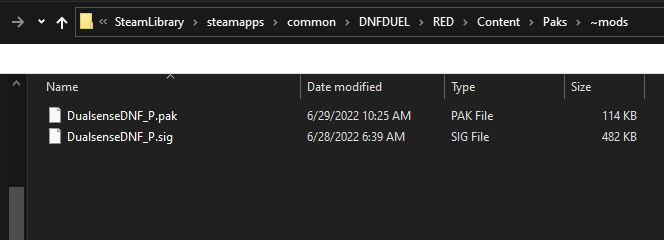
DNF Duel Mod Install-01

That’s it. Now, you’ll have PlayStation Buttons in DNF Duel for the PC. Here are a few screenshots of how it looks with the DualSense controller being used.
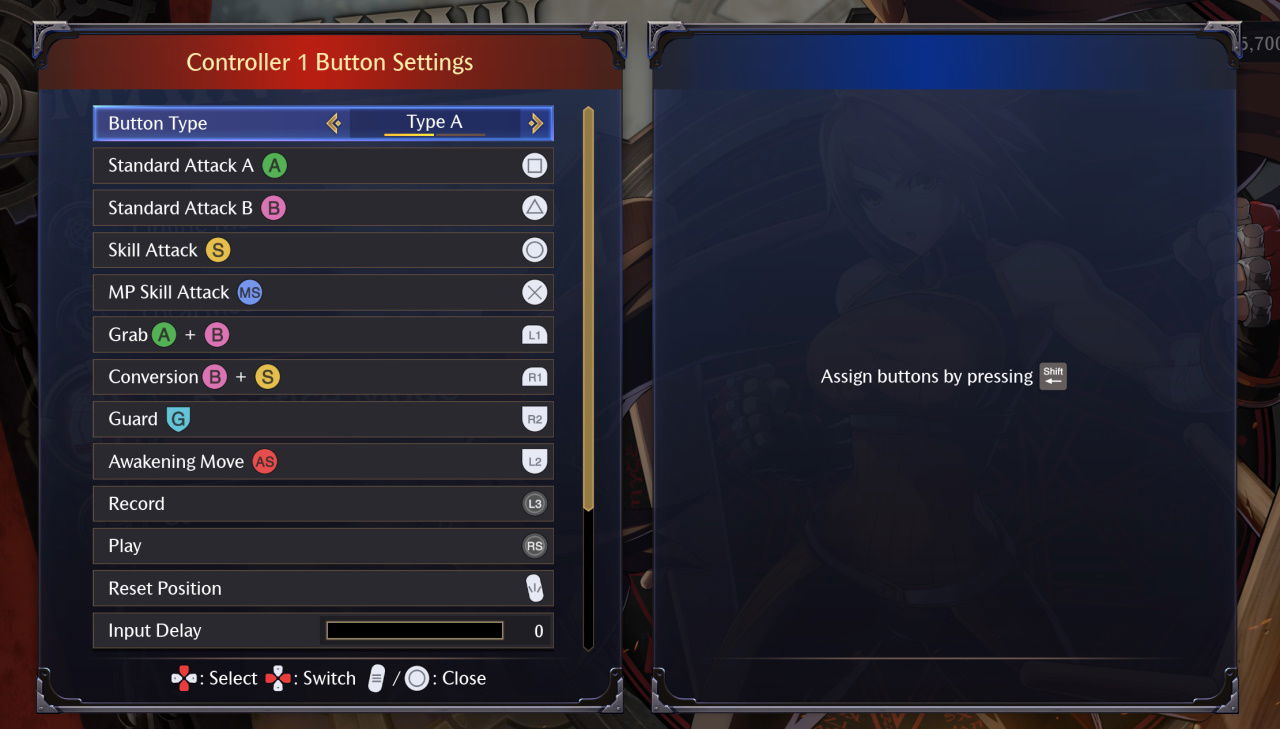
DNF Duel DualSense Buttons

DNF Duel is currently available for the PC (Steam), PS4, and PS5.

DNF Duel DualSense dualshock pc mods
Keith Mitchell - Headshot-PS_Gear_400x400
Keith Mitchell
  • X (Twitter)
  • LinkedIn

Keith D. Mitchell is the founder and Editor-in-Chief of The Outerhaven, where he has been covering video games and technology for more than 14 years. A lifelong PC gamer, he began building PCs at just eight years old and still loves talking about hardware as much as playing games. His passion for challenging experiences has made him a devoted Soulslike fan, having beaten nearly every FromSoftware release. Keith regularly attends major gaming and technology events to bring firsthand coverage to readers, and continues to enjoy writing about the games and gear that shaped his love for the industry.

Latest Articles

Insider Claims Nintendo Switch 2 Has Crossed 15 Million Units Sold

December 6, 2025

Altered TCG Review – A Fresh, Vibrant Adventure in the TCG World

December 6, 2025

Digimon Story Time Stranger Gets First DLC This December With New Megas and Questline

December 5, 2025

Capcom’s December Showcase to Reveal New Details for Monster Hunter Stories 3 and Monster Hunter Wilds

December 5, 2025

Suda51 Reaffirms Desire To Put Games On Nintendo Switch 2

December 5, 2025

Fallout TV Series Success Surprised Todd Howard and Bethesda

December 5, 2025
About Us • Our Team • Contact Us • Privacy Policy • Review Policy
Ethics Policy • Terms of Service • Metacritic • OpenCritic • CriticDB
Ownership & Funding Disclosure • Fact Checking & Corrections Policy • Editorial Policy
Copyright @2025 The Outerhaven Productions

Type above and press Enter to search. Press Esc to cancel.