

Close Menu
  • Latest
  • Help Support Independent Journalism
  • Features
  • Hubs
    • Summer Game Fest 2025
    • CES 2026
  • Gaming
    • All Gaming
    • Nintendo
    • PlayStation
    • Xbox
    • PC Gaming
    • Hardware News
    • VR
  • Guides
  • Entertainment
    • All Entertainment
    • Anime & Animation
    • Movies and TV
    • Books
    • Manga & Comics
    • Toys
    • Geek
    • Pop Culture
  • Previews
  • Reviews
    • All Reviews
    • Video Game
    • Anime & Animation
    • Movie & TV
    • Comic Book & Manga
    • Tech & Gear
    • Food
    • Book
    • Toys
    • Tabletop and Card Game
  • Podcasts
    • A-01 Podcast
    • Nintendo Entertainment Podcast
    • Spectator Mode Podcast
  • Contact Us
X (Twitter) YouTube RSS Bluesky Discord

Follow Us

X (Twitter) Instagram YouTube Bluesky Discord
The OuterhavenThe Outerhaven
  • Latest
  • Features
  • Guides
  • Hubs
    • Summer Game Fest 2025
    • CES 2026
  • Previews
  • Reviews
    • Video Game Reviews
    • Anime & Animation Reviews
    • Comic Book & Manga Reviews
    • Films & TV Reviews
    • Hardware Reviews
    • Tabletop & Card Game Reviews
    • Toy Reviews
  • Gaming
    • PlayStation
    • Nintendo
    • Xbox
    • PC Gaming
    • Tabletop & Card Game
    • Hardware News
    • Virtual Reality
  • Entertainment
    • Anime & Animation
    • Comic Books & Manga
    • Films & TV
    • Original English Light Novels DB
    • OELN DB
    • Pop Culture
    • Books
    • Toys
  • Podcasts
    • A-01 Podcast
    • Nintendo Entertainment Podcast
    • Spectator Mode Podcast
The OuterhavenThe Outerhaven
Home»News»Gaming News»PC Gaming»Updated Xbox App Lets You Launch Installed Games from Other Storefronts

Updated Xbox App Lets You Launch Installed Games from Other Storefronts

By Keith MitchellSeptember 15, 2025
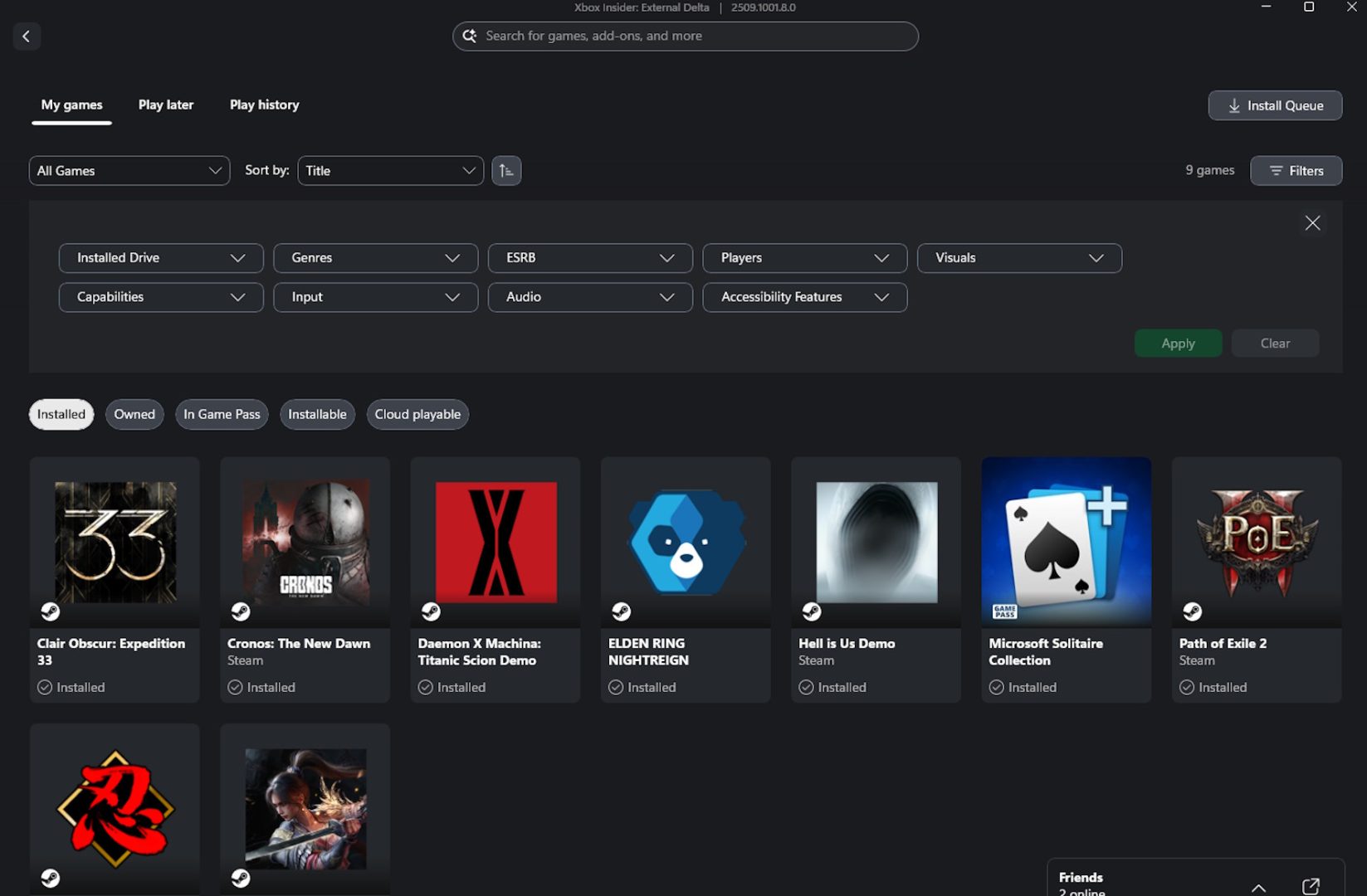
Xbox App aggregated game library image-04

Microsoft has updated the Windows Xbox app with a new feature, one that fans of the app have been looking forward to, the Aggregated Gaming Library.

Basically, the Aggregated Gaming Library, is fancy way of saying that the Xbox app is now a launcher for dozens of other PC gaming storefronts and libraries. Games installed via Steam, Battle.net (I thought this was going away?), GOG, Epic Games Store and PC Game Pass titles will now show up in the Xbox app.

As you can see in my screenshot, you can see that the Xbox app is showing all of the games that I currently have installed on my PC (don’t judge, this is my work PC, not my gaming PC).

And even though I haven’t launched any of these games via the Xbox app, on the left-hand side of the screen, it will also display the last time any of game from the supported libraries have been launched.
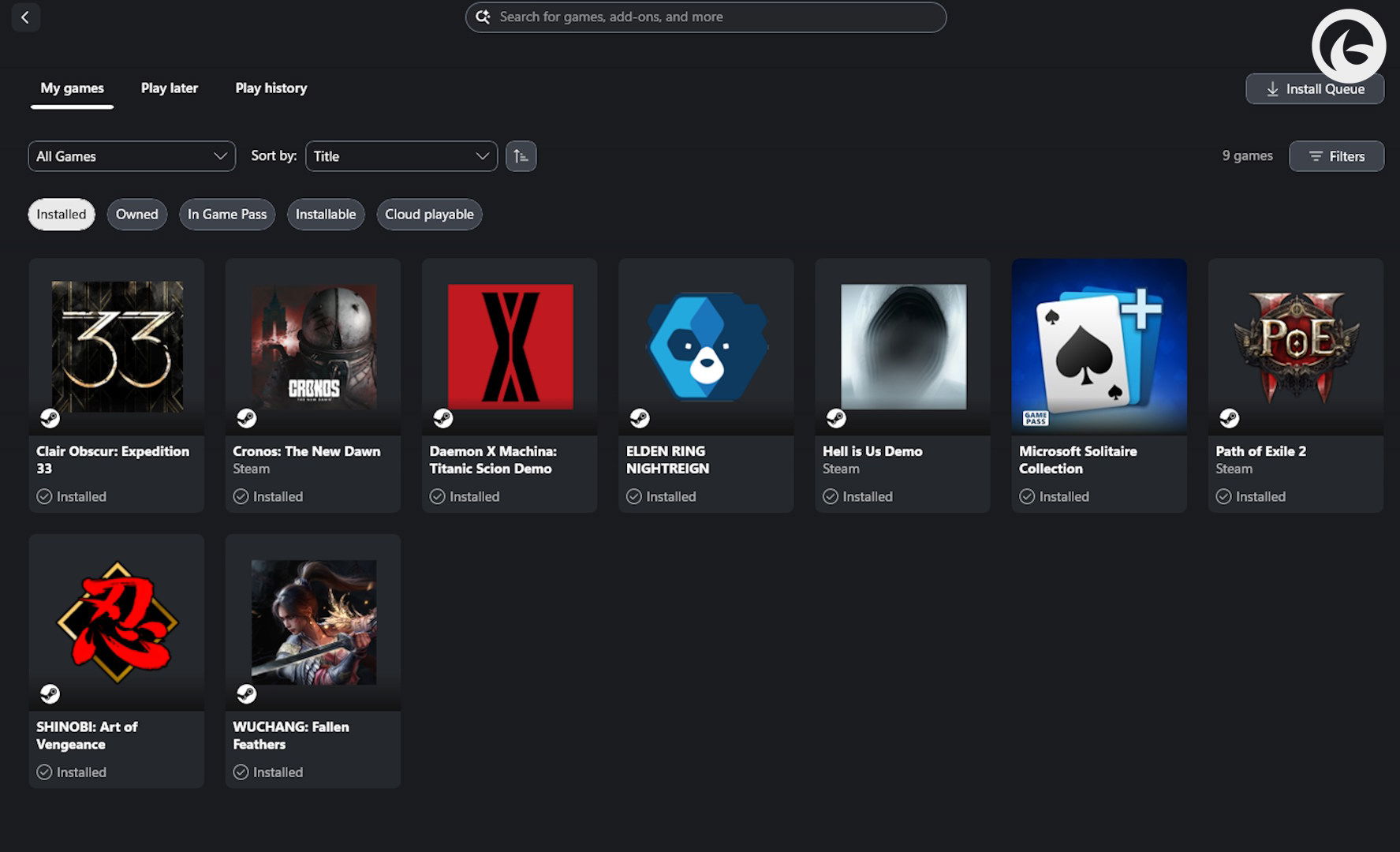
Xbox App aggregated game library image-01

From there, you can click on the game and then you’ll be taken to another screen where you can press play, see the game in its native storefront or launcher, and even manage extensions.
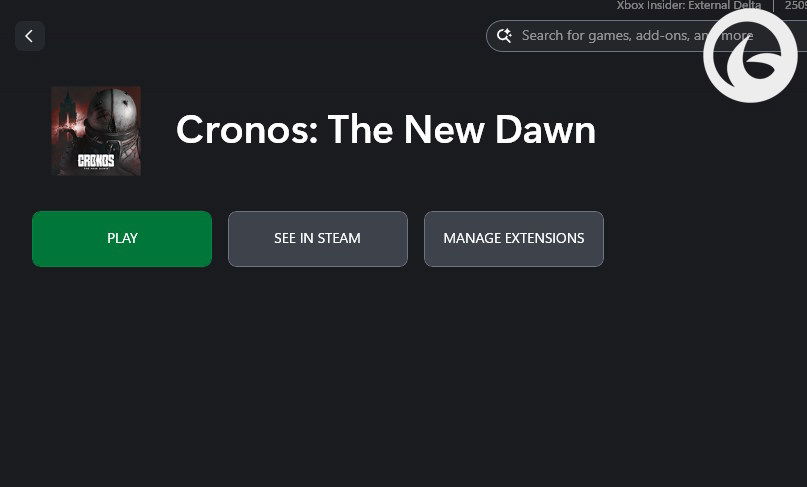
Xbox App aggregated game library image-02

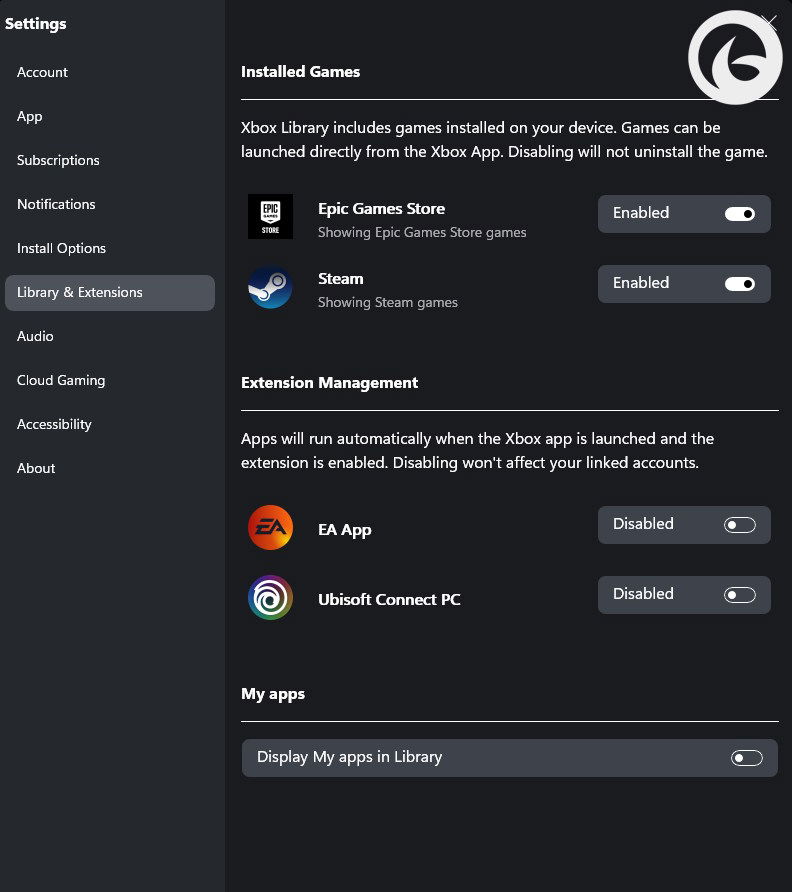
Xbox App aggregated game library image-03

The last part is important, as this allows you to enable which apps will actually show up in the Xbox app. So, if you don’t want Steam or Epic Games Store showing up, you can disable them. There’s even an option to have your installed Windows apps to appear, not that I can fathom why you’d want that.

However, there’s more. With the updated Xbox app, you can also drill down into filters, such as what drive you want to see, which game genres, co-op and single player games, keyboard and mouse or controller, Xbox Play Anywhere, and Xbox Play Anywhere.
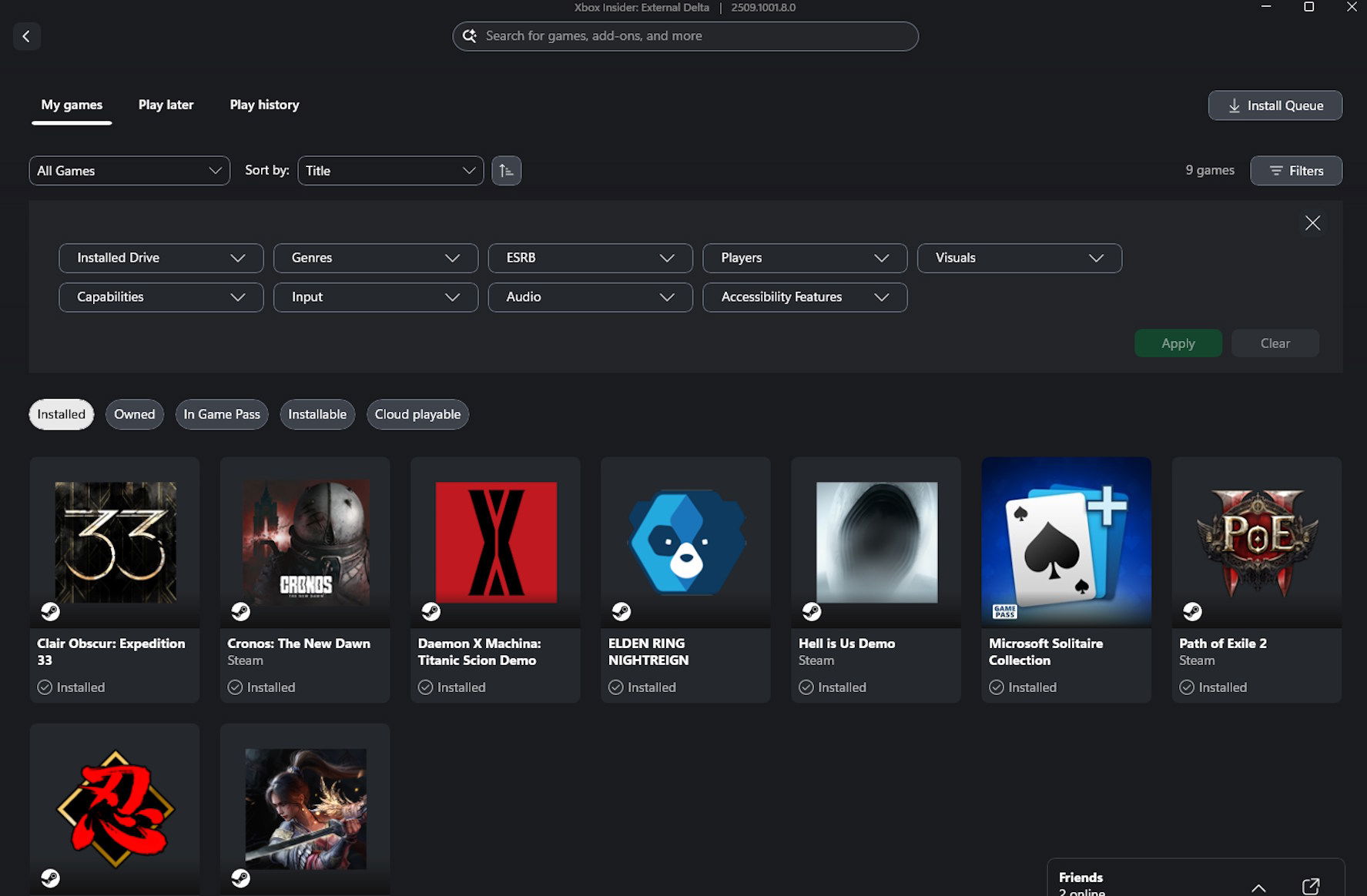
Xbox App aggregated game library image-04

Honestly, it’s an interesting update and I can see this being useful for those who aren’t fans of having to open multiple launchers or using a program, similar to Playnite, and only having the Xbox app handle launching the games. But I can really see this being useful on handheld gaming PCs, such as the ROG Ally X, Legion Go, MSI Claw, and the upcoming ROG Xbox Ally line-up. Which is likely why we’re seeing this being launched now. I’ll give it a try on my PC, but likely many, I’ve swapped from a Window OS to Bazzite. So, if I want to give it a try on my handheld PC, I’ll need to reinstall Windows first.

The updated Xbox application is currently available to download right now, and if you already have the Xbox app installed, chances are that it’s already been updated to reflect the changes.

With this now out, Xbox is working on the next piece of the puzzle, cloud-playable games that will follow you across all of your Windows’s gaming and Xbox devices.

Source: Xbox

Aggregated Gaming Library PC gaming windows Xbox App
Keith Mitchell - Headshot-PS_Gear_400x400
Keith Mitchell
  • X (Twitter)
  • LinkedIn

Keith D. Mitchell is the Founder and Editor-in-Chief of The Outerhaven, covering games and tech for over 14 years. A lifelong PC gamer who began building PCs at age eight, he is a hardware enthusiast, Soulslike devotee, and regular attendee of major gaming and technology events.

Latest Articles

Game Review: Dwarves: Glory, Death, and Loot (PC)

January 31, 2026

Manga Mavericks adds Miles Atherton to Board to Support Aggressive Growth Plans

January 30, 2026

Crunchyroll Announces Acquisition of Anime Film Whoever Steals This Book

January 30, 2026

Early 2026 is Shaping Up to Be a Great Time for Horror Game Fans

January 30, 2026

WWE 2K26 First Details, Developer Q&A and Release Date

January 30, 2026

People Of Note Reveals Voice Cast For Upcoming Turn-Based Combat Music Game

January 30, 2026
About Us • Our Team • Contact Us • Privacy Policy • Review Policy
Ethics Policy • Terms of Service • Metacritic • OpenCritic • CriticDB
Ownership & Funding Disclosure • Fact Checking & Corrections Policy • Editorial Policy
Copyright @2026 The Outerhaven Productions

Type above and press Enter to search. Press Esc to cancel.