

Close Menu
  • Latest
  • Help Support Independent Journalism
  • Features
  • Hubs
    • Summer Game Fest 2025
    • CES 2026
  • Gaming
    • All Gaming
    • Nintendo
    • PlayStation
    • Xbox
    • PC Gaming
    • VR
  • Guides
  • Entertainment
    • All Entertainment
    • Anime & Animation
    • Movies and TV
    • Books
    • Manga & Comics
    • Toys
    • Geek
    • Pop Culture
  • Previews
  • Reviews
    • All Reviews
    • Video Game
    • Anime & Animation
    • Movie & TV
    • Comic Book & Manga
    • Tech & Gear
    • Food
    • Book
    • Toys
    • Tabletop and Card Game
  • Podcasts
    • A-01 Podcast
    • Nintendo Entertainment Podcast
    • Spectator Mode Podcast
  • Contact Us
X (Twitter) YouTube RSS Bluesky Discord

Follow Us

X (Twitter) Instagram YouTube Bluesky Discord
The OuterhavenThe Outerhaven
  • Latest
  • Features
  • Guides
  • Hubs
    • Summer Game Fest 2025
    • CES 2026
  • Previews
  • Reviews
    • Video Game Reviews
    • Anime & Animation Reviews
    • Comic Book & Manga Reviews
    • Films & TV Reviews
    • Hardware Reviews
    • Tabletop & Card Game Reviews
    • Toy Reviews
  • Gaming
    • PlayStation
    • Nintendo
    • Xbox
    • PC Gaming
    • Tabletop & Card Game
    • Virtual Reality
  • Entertainment
    • Anime & Animation
    • Comic Books & Manga
    • Films & TV
    • Original English Light Novels DB
    • OELN DB
    • Pop Culture
    • Books
    • Toys
  • Tech News
  • Podcasts
    • A-01 Podcast
    • Nintendo Entertainment Podcast
    • Spectator Mode Podcast
The OuterhavenThe Outerhaven
Home»News»Guides»Syncing The NZXT SwitchMix Troubleshooting

Syncing The NZXT SwitchMix Troubleshooting

By Scott AdamsMarch 27, 2025
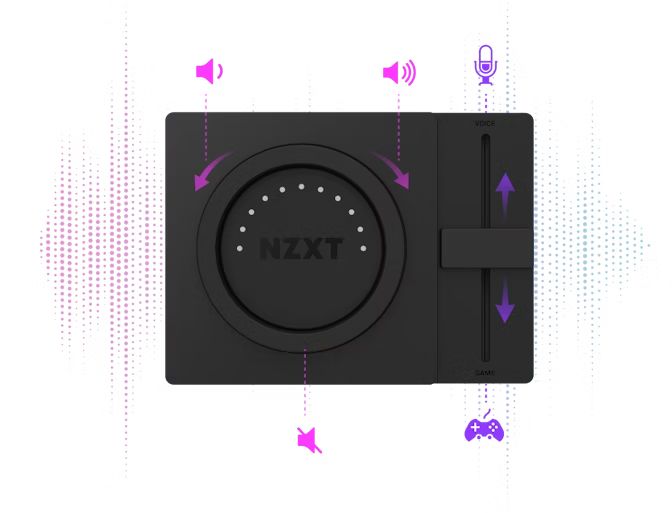
The main mixer for the NZXT SwitchMix

So you got the new NZXT SwitchMix to help moderate the audio levels between the game you are playing and the voice chat you are in. You will see a pretty easy set up. Plug in the SwitchMix into your PC and then the main box into headphone stand and your headset into the headphone port. Now you get to do the fun part of making sure your PC recognizes that the NZXT SwitchMix is plugged in. If it is, then when you go to the sound mixer on your PC it should look a little something like this:
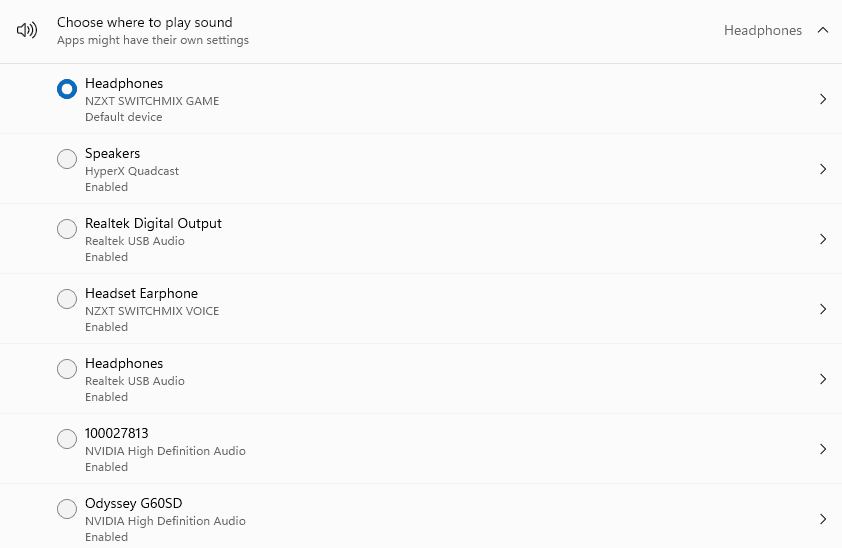
Volume Mixer Headphones menu for checking that the NZXT Switchmix works

The next part of the volume mixer should look like this:
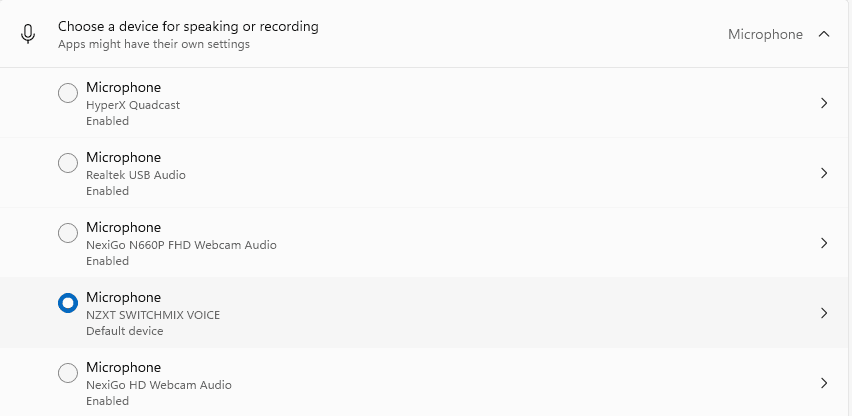
Volume Mixer for NZXT Switchmix microphone input

If it doesn’t look like this, it might not recognize the SwitchMix or it might not be connected to a USB 3.0 port. If it is on a 3.0 port, try placing it on a different port, or if all else fails you can remove the end of it and it turns into a USB-C that you can put into a USB-C port.

Headset Woes

One problem I came across with setting up NZXT SwitchMix was the headset not being able to fully integrate the microphone attached to the headset. The way I was able to figure out that I needed to update the drivers was from the NZXT website. Download NZXT Cam.NZXT Switchmix NZXT Cam application
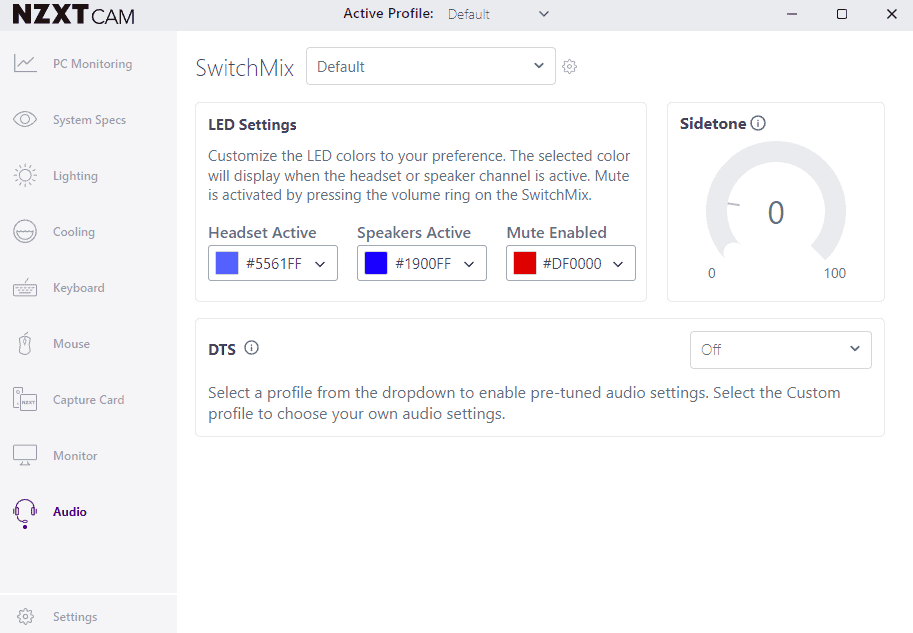
When you open this screen on the audio screen you might have a “UPDATE NEEDED” sign right above the Sidetone menu on the right. Do the update, then restart your PC. Once it is updated, an easy way to test to see if the microphone works is to use that Sidetone menu. Click somewhere within the bar and talk into your Mic. If you can hear yourself, good job! Now you can turn the Sidetone back to 0 and be confident that the NZXT Switchmix hears your microphone.

All of this is meant to help synchronize headsets to the NZXT Switchmix. If you are using a usb microphone or an auxiliary microphone, all that requires is directly connecting it to your PC.

You can buy the NZXT SwitchMix at their website if you are interested in trying it out for yourself.

Guide NZXT Switchmix Troubleshooting
Avatar photo
Scott Adams
  • Website
  • Facebook
  • X (Twitter)

Scott Adams has been a strong lover of video games, mainly RPGS, for 20 years. He typically writes about the video games he loves, also reviews many of them, and he is a regular on the Nintendo Entertainment Podcast.

Latest Articles

Duet Night Abyss Comes To Steam

January 20, 2026

AnimeJapan 2026 Full 50-Stage Lineup Announced, Ticket Sales Now Open

January 19, 2026

Tokyo Clanpool Getting An Uncut Physical Release On PC?!

January 19, 2026

Bungie’s Marathon Gets An Official Release Date

January 19, 2026

MIO: Memories in Orbit Review – A Gorgeous Metroidvania Worth Getting Lost In

January 19, 2026

FX Fighter Kurumi-chan Receives TV Anime

January 19, 2026
About Us • Our Team • Contact Us • Privacy Policy • Review Policy
Ethics Policy • Terms of Service • Metacritic • OpenCritic • CriticDB
Ownership & Funding Disclosure • Fact Checking & Corrections Policy • Editorial Policy
Copyright @2026 The Outerhaven Productions

Type above and press Enter to search. Press Esc to cancel.