

Close Menu
  • News
  • Features
  • Guides
  • Interviews
  • Reviews
  • Previews
  • About Us
  • Metacritic
  • OpenCritic
  • CriticDB
X (Twitter) YouTube RSS Bluesky Discord

Follow Us

Facebook X (Twitter) YouTube Bluesky
The OuterhavenThe Outerhaven
  • Home
  • Features
  • Guides
  • Hubs
    • Summer Game Fest 2025
    • CES 2026
  • Previews
  • Reviews
    • Video Game Reviews
    • Anime & Animation Reviews
    • Comic Book & Manga Reviews
    • Films & TV Reviews
    • Hardware Reviews
    • Tabletop & Card Game Reviews
    • Toy Reviews
  • Gaming
  • Entertainment
    • Anime & Animation
    • Comic Books & Manga
    • Films & TV
    • Original English Light Novels DB
    • OELN DB
    • Pop Culture
    • Books
    • Toys
  • Podcasts
    • A-01 Podcast
    • Nintendo Entertainment Podcast
    • Spectator Mode Podcast
The OuterhavenThe Outerhaven
Home»News»Guides»How to Take a Photo in Marvel’s Spider-Man 2

How to Take a Photo in Marvel’s Spider-Man 2

By Faith LaneOctober 20, 2023

Players of Marvel’s Spider-Man 2 are hyped to dive further into this new adventure with their favorite friendly neighborhood spider-man. However, outside of fighting crime, collecting suits, and finishing the story, players will find some other fun things to do in the latest sequel to Marvel’s Spider-Man and Miles Morales. Players will be pleased to know that they can participate in using Photo Mode, which allows them to capture cool moments from the game to share wherever they wish from their PlayStation 5.

How To Use Photo Mode
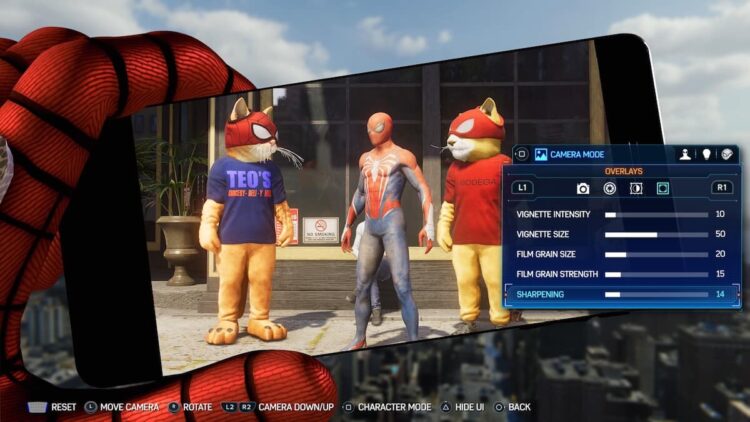
In Photo Mode, whatever scene players see on their screen will pause in time in order for players to be able to take a screenshot of that scene. When in this game mode, players will also be able to adjust the angle of the camera, and the filters, if Spider-Man shows up in it or his enemies. The possibilities of how the pictures come out are endless.

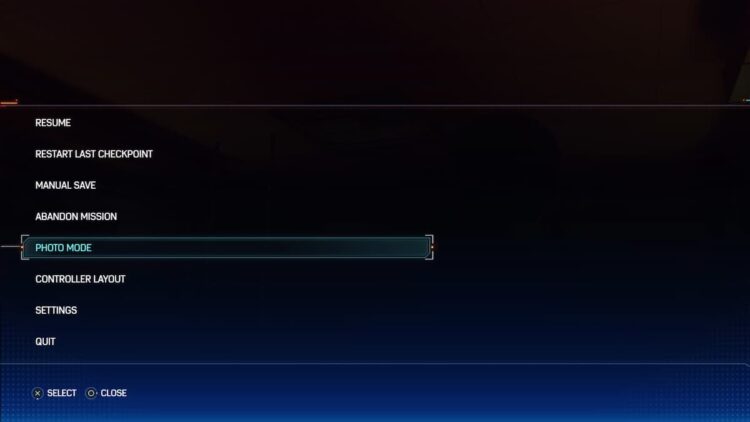
To get to the Photo Mode, click the Menu button on the PS5 controller. This will open up a new menu that has many different options for players to browse, but they will see Photo Mode toward the bottom. Once clicking it, it will go back to the gameplay screen, but it will be frozen for the reason of taking the picture.
Marvel's Spider-Man 2 Photo Mode

Once entering the Photo Mode, players can then take pictures to their heart desires. There are many different locations in Marvel’s Spider-Man 2 that players can go to that have some pretty neat setups, such as the one above. These will sometimes have little green cameras making them on the map, making it an easy pathway to the destination.

Players won’t really need this feature or any in-game missions, but it will be something that players will enjoy so they can grab some really cool pictures of this friendly Spider-Man. And speaking of cool photos, has anyone seen Carnage as of yet? Oh, he’s not in this game? Well, maybe next time.

Marvel Games Marvel's Spider-Man 2 PlayStation 5 Spider-Man
Avatar photo
Faith Lane
  • Website
  • X (Twitter)
  • Instagram

Faith Lane is a self-published Christian author, journalist, editor, ghostwriter, and fangirl. She loves all things fandom and video games and loves to share her passion with her readers through her writing.

Latest Articles

Phil Spencer Retires, Sarah Bond Resigns From Xbox

February 20, 2026

Fatal Fury: City of the Wolves Nightmare Geese Release Date Revealed

February 20, 2026

Quiddiya City Owned RTS Acquires Evo

February 20, 2026

Bluepoint Games Shut Down by Sony Interactive Entertainment in Latest Wave of Industry Cuts

February 20, 2026

Armatus Preview

February 20, 2026

From Overshadowed to Overpowered Receives TV Anime

February 19, 2026
About Us • Our Team • Contact Us • Privacy Policy • Review Policy
Ethics Policy • Terms of Service • Fact Checking & Corrections Policy • Editorial Policy

Find our reviews on Metacritic • OpenCritic • CriticDB
Copyright @2026 The Outerhaven Productions

Type above and press Enter to search. Press Esc to cancel.