


Close Menu
  • Latest
  • Help Support Independent Journalism
  • Features
  • Hubs
    • Summer Game Fest 2025
    • CES 2026
  • Gaming
    • All Gaming
    • Nintendo
    • PlayStation
    • Xbox
    • PC Gaming
    • Hardware News
    • VR
  • Guides
  • Entertainment
    • All Entertainment
    • Anime & Animation
    • Movies and TV
    • Books
    • Manga & Comics
    • Toys
    • Geek
    • Pop Culture
  • Previews
  • Reviews
    • All Reviews
    • Video Game
    • Anime & Animation
    • Movie & TV
    • Comic Book & Manga
    • Tech & Gear
    • Food
    • Book
    • Toys
    • Tabletop and Card Game
  • Podcasts
    • A-01 Podcast
    • Nintendo Entertainment Podcast
    • Spectator Mode Podcast
  • Contact Us
X (Twitter) YouTube RSS Bluesky Discord

Follow Us

X (Twitter) Instagram YouTube Bluesky Discord
The OuterhavenThe Outerhaven
  • Latest
  • Features
  • Guides
  • Hubs
    • Summer Game Fest 2025
    • CES 2026
  • Previews
  • Reviews
    • Video Game Reviews
    • Anime & Animation Reviews
    • Comic Book & Manga Reviews
    • Films & TV Reviews
    • Hardware Reviews
    • Tabletop & Card Game Reviews
    • Toy Reviews
  • Gaming
    • PlayStation
    • Nintendo
    • Xbox
    • PC Gaming
    • Tabletop & Card Game
    • Hardware News
    • Virtual Reality
  • Entertainment
    • Anime & Animation
    • Comic Books & Manga
    • Films & TV
    • Original English Light Novels DB
    • OELN DB
    • Pop Culture
    • Books
    • Toys
  • Podcasts
    • A-01 Podcast
    • Nintendo Entertainment Podcast
    • Spectator Mode Podcast
The OuterhavenThe Outerhaven
Home»News»Hardware News»How to disable the RGB lighting on the Asus ROG Ally

How to disable the RGB lighting on the Asus ROG Ally

By Keith MitchellJune 13, 2023
Asus Rog Ally glamour shot
Image credit: Asus

The Asus ROG Ally is a fantastic gaming device; I’m sure you’ve all heard about it. So far, I’m enjoying mine, although the RGB lighting can sometimes be annoying. But more importantly, it’s also sapping precious battery life that could be used for more gaming time. S0, let’s fix that.

In this guide, I will explain how to put the kibosh on the RGB lighting and regain some battery life.

Option 1:

First, power on your Asus ROG Ally if it isn’t already on. Then head to the Armory SE app and then the Settings tab. You’ll see several options available here, but you want to head to the lighting section.
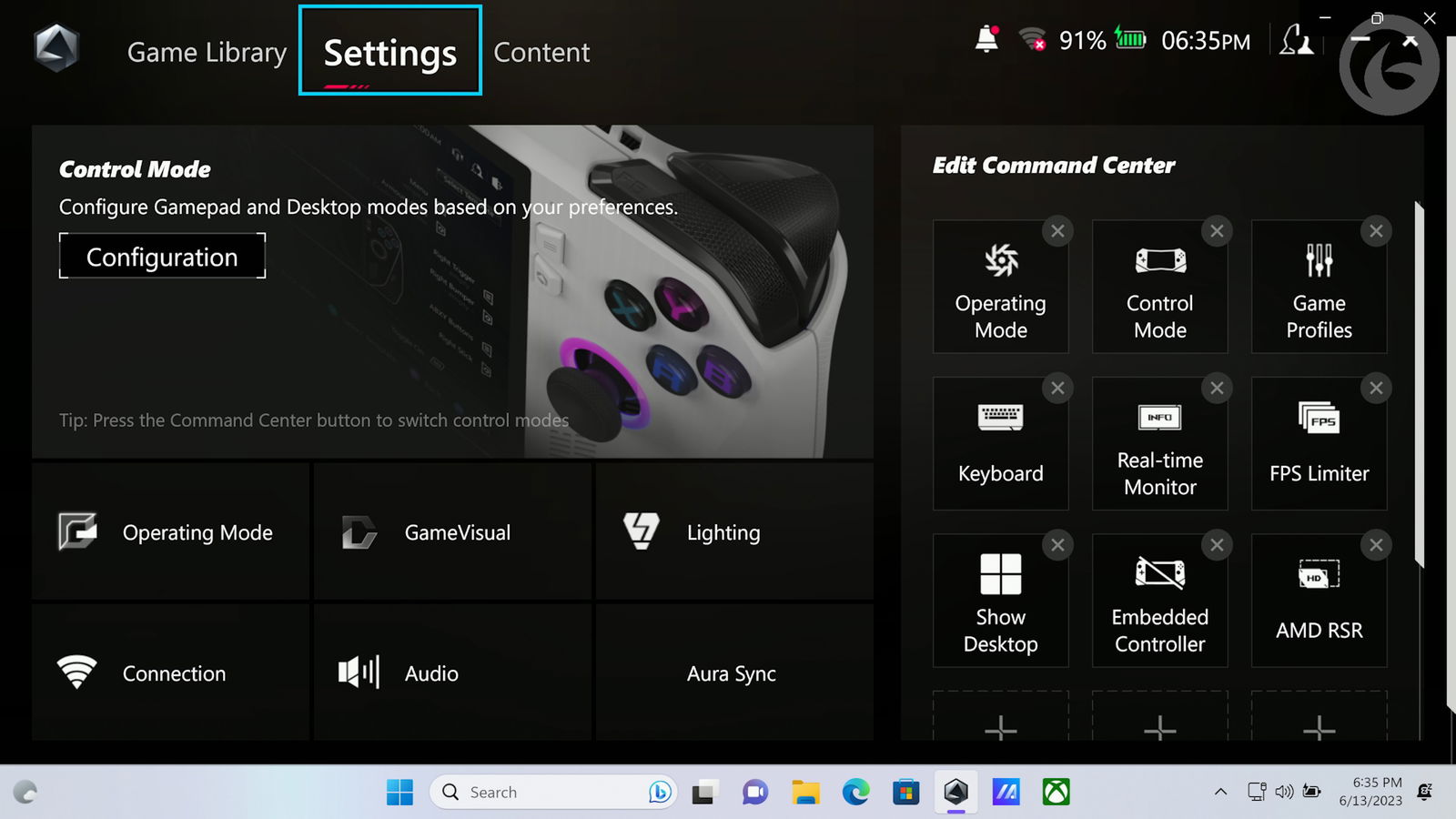
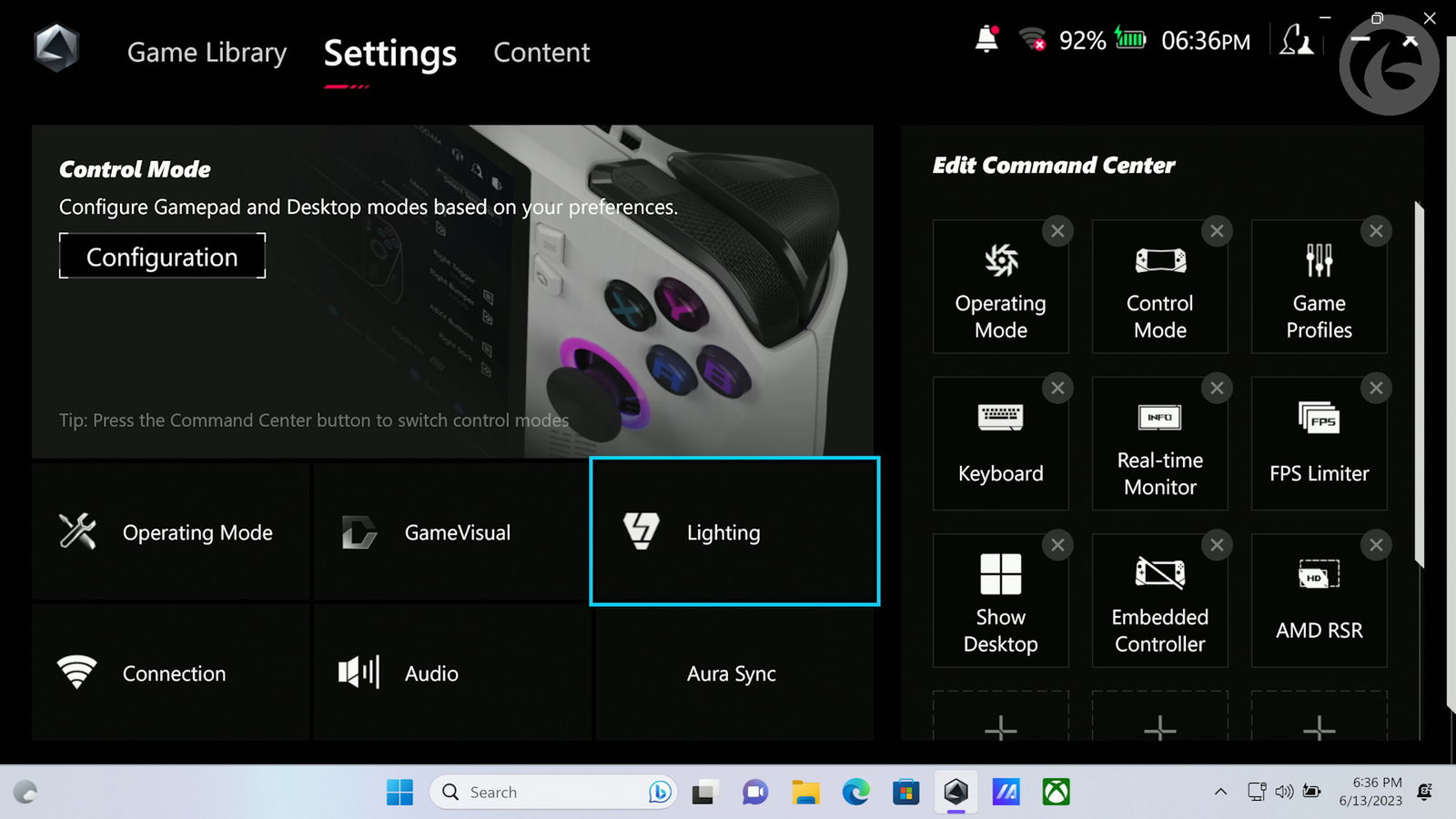
Disable Lighting Asus Rog Ally-01 Disable Lighting Asus Rog Ally-02

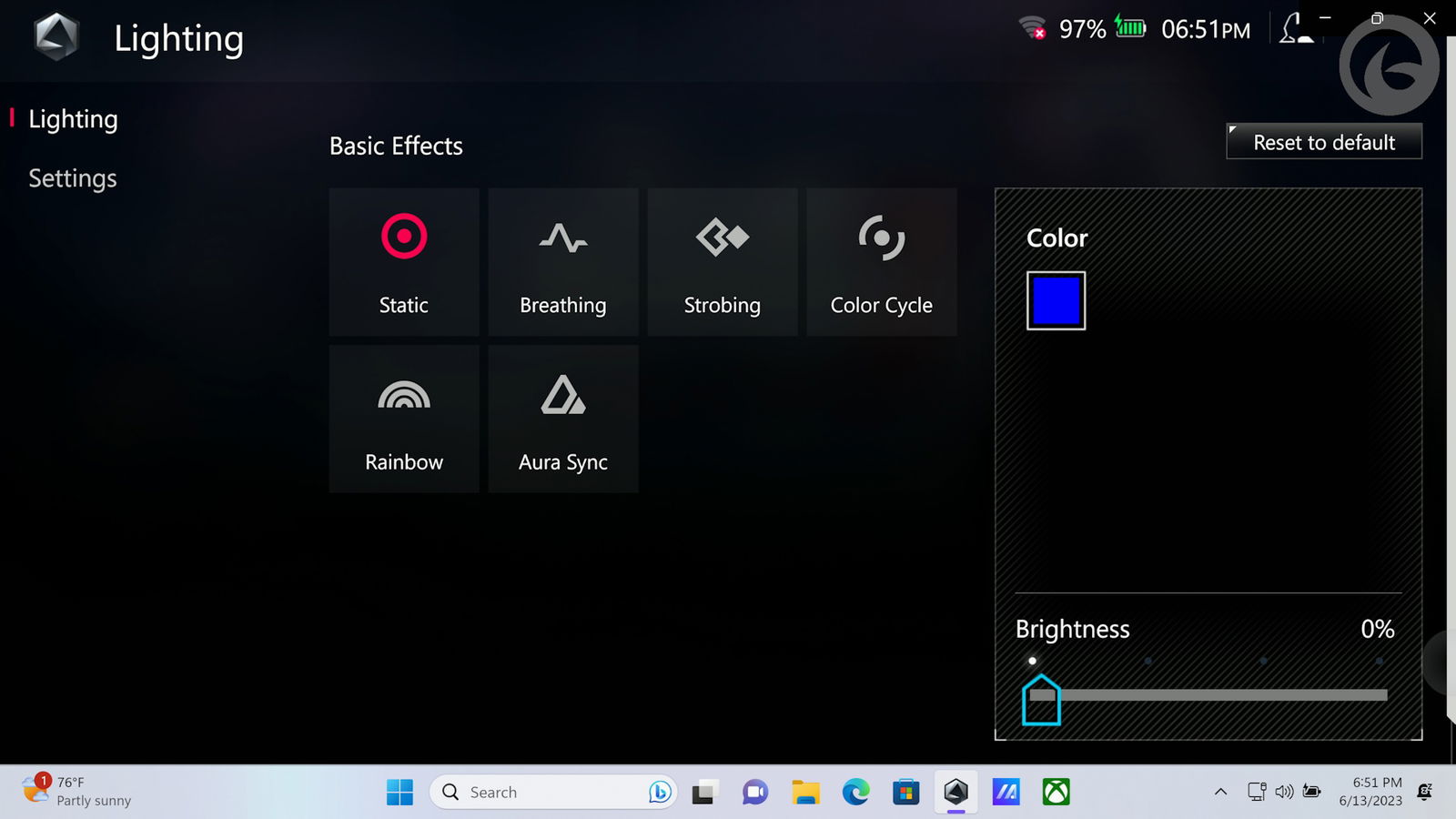
Here, you can select from several different effects, but we want to change it to Static and then change the brightness to 0%. Technically, you can also do this effect, but as Static is the first effect, that’s what I went with.

That’s it!
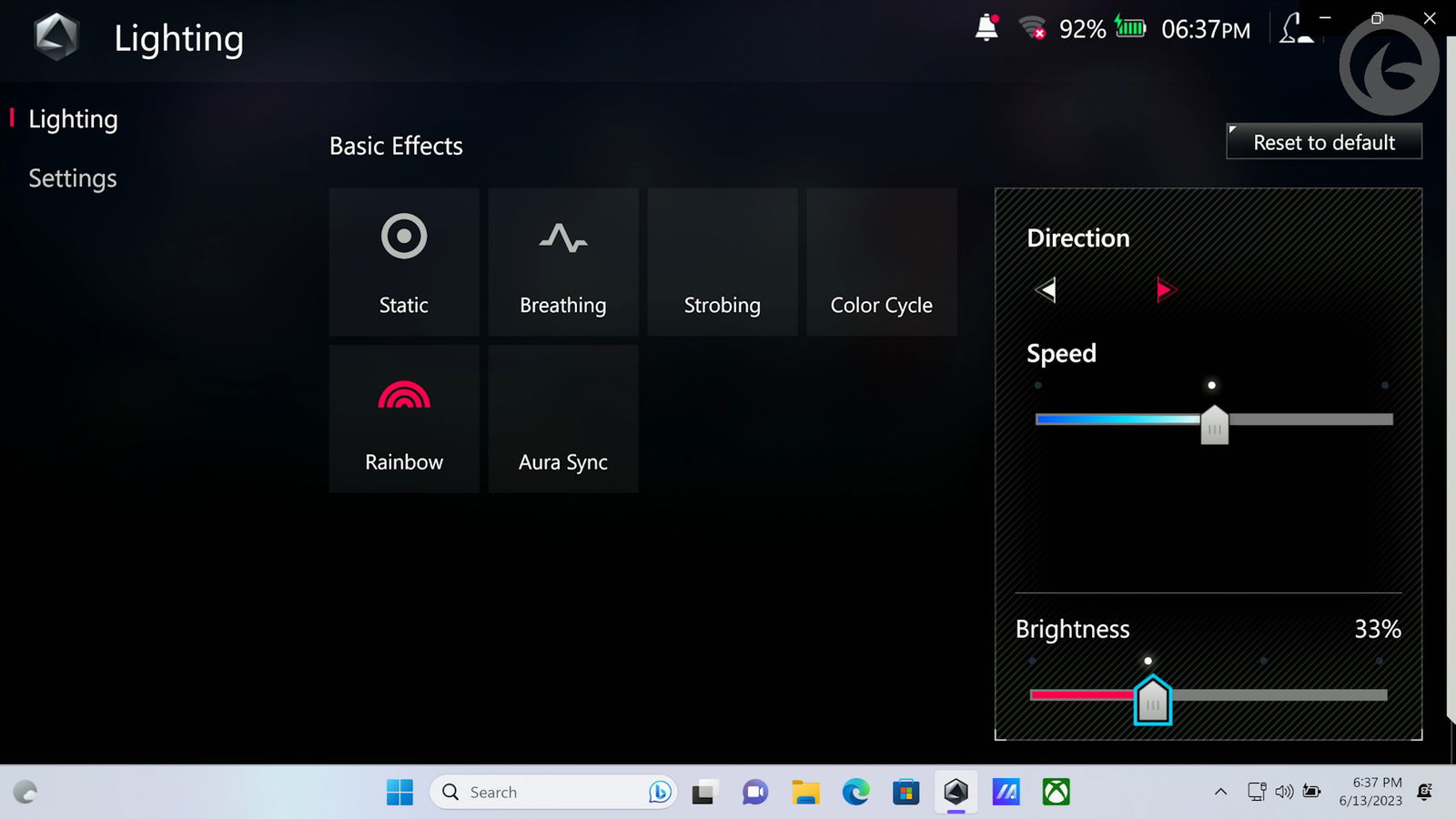
Disable Lighting Asus Rog Ally-03 Disable Lighting Asus Rog Ally-04

Here, you can select from several different effects, but what we want to do is change it to Static and then change the brightness to 0%. Technically, you can also do this effect, but as Static is the first effect, that’s what I went with.

That’s it!
Option: 2

You’ll still need to head to the lighting section I pointed out in option 1. Except this time, instead of changing the brightness, we will completely kill off the lighting. To do this, head to the Settings under the Lighting section.

Once there, change the Boot up, Shut Down, and Awake to “Off.” This will completely stop the RGB lighting from ever coming on.
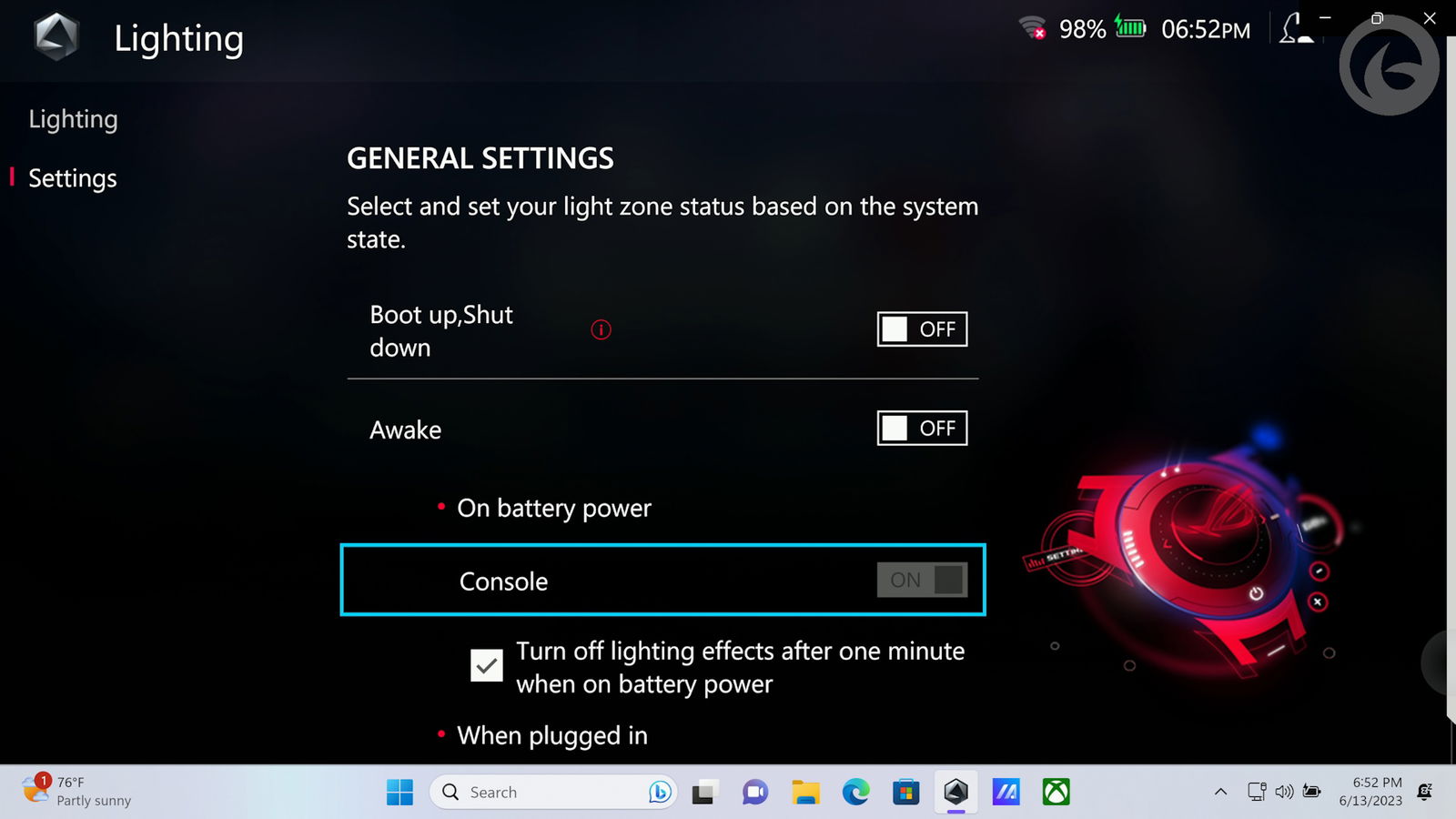
Now enjoy your Asus ROG Ally, knowing you just saved yourself some precious battery life.

Asus Rog Ally Handheld Gaming PC
Keith Mitchell - Headshot-PS_Gear_400x400
Keith Mitchell
  • X (Twitter)
  • LinkedIn

Keith D. Mitchell is the Founder and Editor-in-Chief of The Outerhaven, covering games and tech for over 14 years. A lifelong PC gamer who began building PCs at age eight, he is a hardware enthusiast, Soulslike devotee, and regular attendee of major gaming and technology events.

Latest Articles

Blades of Fire Launches on Steam May 14, Bringing Major Free Update and New Game Plus

February 11, 2026

Update: Wildlight Entertainment Hit With Layoffs Just Weeks After Highguard Launch

February 11, 2026

One Piece Is Free on Shonen Jump for Limited Time

February 11, 2026

Chainsaw Man – The Movie: Reze Arc is Heading to Crunchyroll

February 11, 2026

The Whitest Kids U’Know MARS Coming to Select Theaters

February 11, 2026

Reanimal Review – Tarsier Studios’ Darkest Turn Yet

February 11, 2026
About Us • Our Team • Contact Us • Privacy Policy • Review Policy
Ethics Policy • Terms of Service • Fact Checking & Corrections Policy • Editorial Policy

Find our reviews on Metacritic • OpenCritic • CriticDB
Copyright @2026 The Outerhaven Productions

Type above and press Enter to search. Press Esc to cancel.