

To get the most out of your Black Ops 6 gameplay, it’s essential to optimize your audio settings to clearly hear your opponents’ movements and capture every detail of the environment. With new mechanics like omnimovement and a dedicated melee weapon slot, gameplay is more intense than ever, requiring top-notch audio settings to match.
Here are the best audio settings for Black Ops 6, helping you improve enemy detection and gain a competitive edge.
Use Headphones for the Best Audio Experience
Headphones are crucial for maximizing audio in Black Ops 6, especially for directional sounds that let you pinpoint where footsteps are coming from. Even the best audio settings lose their effectiveness through TV or monitor speakers. When using headphones, it’s recommended to enable Bass Boost mode, which emphasizes bass, making the game’s audio more immersive and increasing the likelihood of hearing opponents’ movements.
Best Audio Settings for Black Ops 6
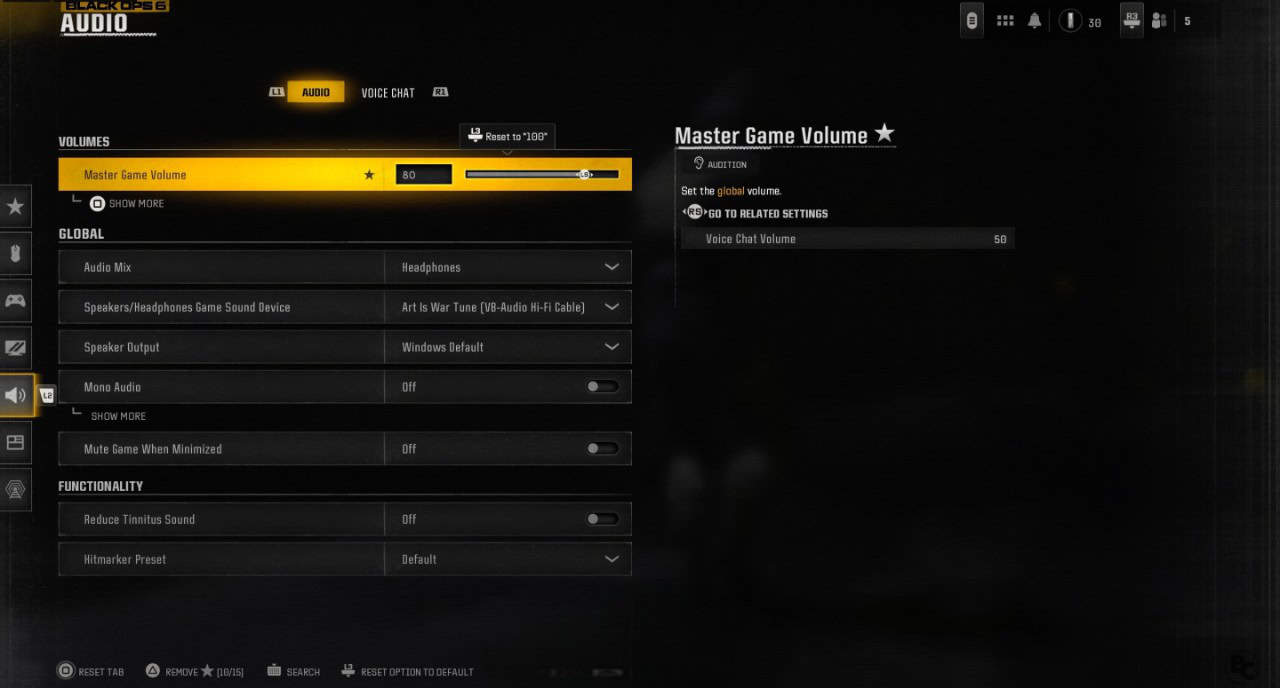
With your headphones ready, here are the best audio settings for Black Ops 6, specifically tuned for hearing opponents’ footsteps and movements.
Volume
- Master Volume: 80
- Music Volume: 0
- Dialogue Volume: 80
- Effects Volume: 100
- Cinematic Music Volume: 0
Audio Device
- Enhanced Headphone Mode: On
- Audio Mix: Headphones
- Speakers/Headphones Game Sound Device: Default System Device
- Mono Audio: Off
- Mute Licensed Music: On
- Asymmetric Hearing Compensation: Off
- Speaker Output: Stereo
- Mute Game When Minimized: Disable
Functionality
- Reduce Tinnitus Sound: Off
- Hit Marker Sound Effects: Default
Voice Chat
- Voice Chat Volume: 50
- Voice Chat: On
- Proximity Chat: Enable
- Body Shield Chat: Enable
- Last Words Voice Chat: Deactivate
- Game Voice Channel: Party Only
- Voice Chat Output Device: Default System Device
Microphone
- Microphone Level: 100
- Test Microphone: Off
- Microphone Mode: Push to Talk
- Mute Yourself When Connecting to Channel: Off
- Microphone Input Device: Default System Device
These settings provide a good starting point to get the most out of your sound in Black Ops 6. Feel free to adjust them according to your personal preferences and gameplay style.
What is Loudness Equalization and How to Enable It?
For PC players, Loudness Equalization is an option that enhances the clarity of footsteps, making them easier to distinguish from other sounds. Unfortunately, this feature isn’t available on PlayStation or Xbox. Here’s how to enable it:
- Go to your PC’s sound settings.
- Select the Playback tab.
- Find your audio device, right-click it, and select Properties.
- Go to the Enhancements tab.
- Select the Loudness Equalization option.
- Click Apply to save changes.
This feature improves footstep detection across all Black Ops 6 game modes, giving you an extra edge in anticipating enemy movements.
Advanced Headphone Mode
Black Ops 6 also introduces an Advanced Headphone Mode for players seeking even more audio precision. Available in both a free and a $20 premium version, this feature provides high-end audio enhancements for those looking for a top-tier audio experience.
For a deeper look at the game, don’t miss our full review, where we said, “Call of Duty: Black Ops 6 is the complete package, a great single-player campaign, best-in-class first-person shooter gameplay, fun fast-paced multiplayer, and the return of round-based zombies.”
Black Ops 6 was launched on October 25, 2024, for PlayStation 4, PlayStation 5, PC, Xbox One, and Xbox Series X|S.
More Call of Duty Reading:
