


Close Menu
  • News
  • Features
  • Guides
  • Interviews
  • Reviews
  • Previews
  • About Us
  • Metacritic
  • OpenCritic
  • CriticDB
X (Twitter) YouTube RSS Bluesky Discord

Follow Us

Facebook X (Twitter) YouTube Bluesky
The OuterhavenThe Outerhaven
  • Home
  • Features
  • Guides
  • Hubs
    • Summer Game Fest 2025
    • CES 2026
  • Previews
  • Reviews
    • Video Game Reviews
    • Anime & Animation Reviews
    • Comic Book & Manga Reviews
    • Films & TV Reviews
    • Hardware Reviews
    • Tabletop & Card Game Reviews
    • Toy Reviews
  • Gaming
  • Entertainment
    • Anime & Animation
    • Comic Books & Manga
    • Films & TV
    • Original English Light Novels DB
    • OELN DB
    • Pop Culture
    • Books
    • Toys
  • Podcasts
    • A-01 Podcast
    • Nintendo Entertainment Podcast
    • Spectator Mode Podcast
The OuterhavenThe Outerhaven
Home»News»Gaming News»PlayStation VR Aim Controller to Launch with Farpoint May 16th

PlayStation VR Aim Controller to Launch with Farpoint May 16th

By Yhani JonesMarch 7, 2017
 
Thanks to more information from the GDC Expo, the PlayStation VR Aim Controller, Sony’s first VR controller developed for VR shooting games, will finally be available alongside the release of PlayStation’s VR game Farpoint on May 16th. If you’re not as familiar with this brand new immersive first person shooter, take a look at their teaser trailer below. 
 

During the GDC Expo last week, Sony held a number of speaker sessions where notable PlayStation contributors discussed how developers can make use of the PlayStation’s Aim Controller technology and show believable character behaviors with its movement.
 
The the hangar like design of the Aim Controller features all of the buttons that you’re familiar with on your standard game controller. Rather than the player use their DualShock 4 to shoot down enemies, they hold the light, gun shaped Aim Controller along with their VR headsets, giving them a more natural and immersive shooting experience.
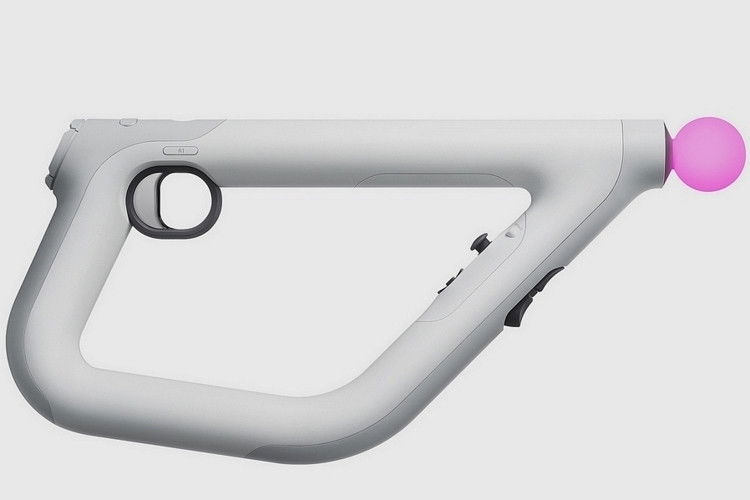
The orb in the front of the controller is similar to the orbs found on the PlayStation Move controllers and is used to match your movement with the camera. The bottom of the controller which give you access to the left shoulder and trigger buttons, L1 and L2.
 
You will find the left D-Pad and analog stick near the share and options buttons located on the inside of the controller.  R2 is the trigger on the controller, and there are two R1 buttons for both left and right handed users.
 
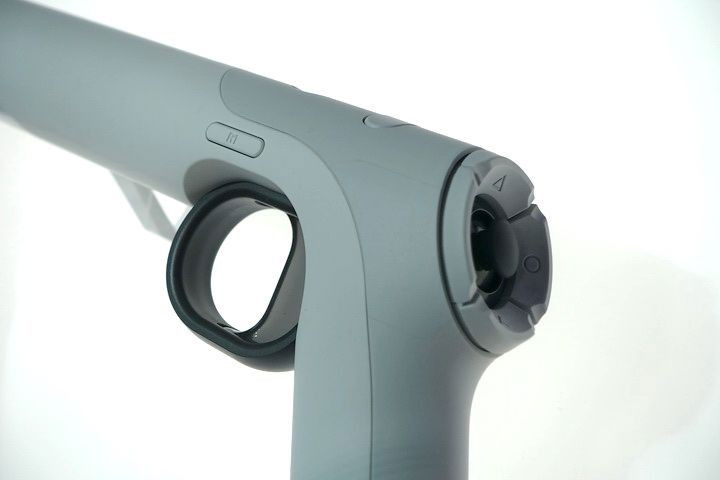
The back of the controller, (where you’ll place your thumb) has your triangle, circle, X, and square buttons, each wrapped in a D-Pad like fashion around your second analog stick. On top you’ll find the power button and a touch bar like button. This one is similar to that of the DualShock’s only without the cool touch capabilities. 
 
Having a gun-shaped controller for our first person shooter games is truly bringing new immersive experiences to our very own living rooms! Get ready for the cool new PlayStation VR Aim Controller along with Farpoint for PS VR  this summer on May 16th.
Farpoint playstation PS VR Ps4
Avatar photo
Yhani Jones
  • X (Twitter)

A little bit of Marvel, a little bit of DC, and a whole lot of games! Comic book reader and lover of all things PlayStation.

Latest Articles

From Overshadowed to Overpowered Receives TV Anime

February 19, 2026

MediaOCD Announces More Classic Anime Home Media Titles from Discotek Media for February Release

February 19, 2026

GRIDbeat! Is Headed to Switch and PC With a Rhythm-Driven Twist

February 19, 2026

Mouse: P.I. For Hire Shows Off Boss Fight In New Trailer

February 19, 2026

Fatal Fury City of the Wolves: Street Fighter VI Collab Round 3 Announced

February 19, 2026

Etrange Overlord Gets New Gameplay Trailer

February 19, 2026
About Us • Our Team • Contact Us • Privacy Policy • Review Policy
Ethics Policy • Terms of Service • Fact Checking & Corrections Policy • Editorial Policy

Find our reviews on Metacritic • OpenCritic • CriticDB
Copyright @2026 The Outerhaven Productions

Type above and press Enter to search. Press Esc to cancel.