When it comes to Microsoft and PC gaming, it has always felt like a love-hate relationship, and the latest Windows 11 update proves it yet again. After update KB5074109 rolled out, I, like many others, noticed a drop in performance on Nvidia GPUs, specifically in frame rates. This is on top of the prior issues with this update causing BSODs for some who installed the update.
What initially felt like another frustrating coincidence has now been confirmed by Nvidia themselves, as seen by Windows Latest, over on the official Nvidia forums, the company acknowledged that this update is negatively impacting performance.
So far, Microsoft has not said a word. That silence is frustrating, but at least there is a temporary workaround: uninstall the update.
What makes this situation even worse is Microsoft officially ended support for Windows 10 back in October 2025. An operating system that, if we are being honest, is simply more mature when it comes to gaming. Despite that, Windows 11 continues to be pushed aggressively, even though it still has issues like this. And while reinstalling Windows 10 might sound tempting, it is no longer a real option. It will not receive updates, and developers are already beginning to pull support.
For now, the best advice is simple. Uninstall the update and wait to see whether Microsoft or Nvidia steps in with a proper fix first.
If you aren’t sure how to install the update, not to worry, we got you covered.
- Goto the search bar and type “Settings” and then open it.
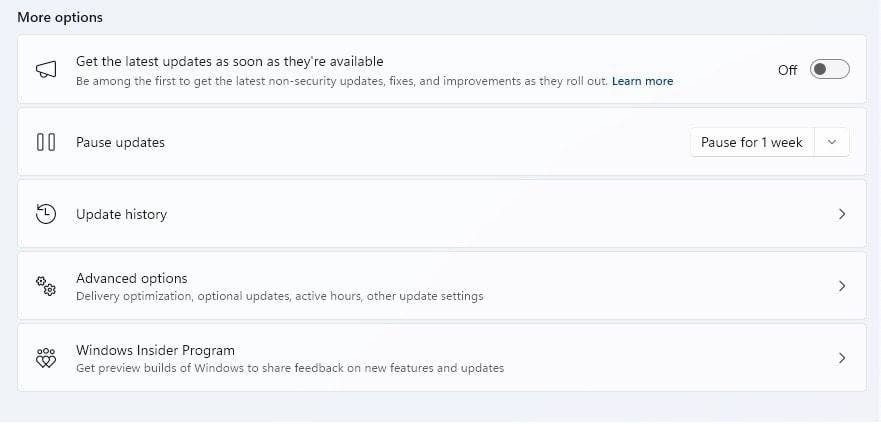
- On the bottom left-hand side, select “Windows Update.”
- In the Windows Update section, select “Update history.”

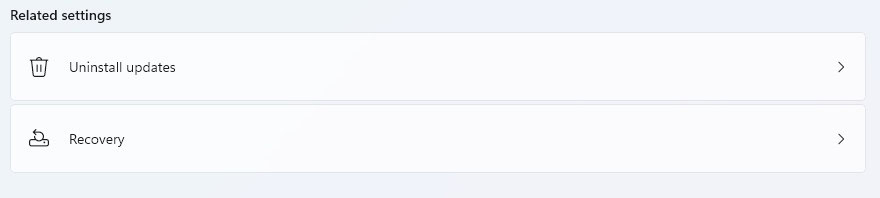
- Towards the bottom, you’ll see the option “Uninstall Updates.”

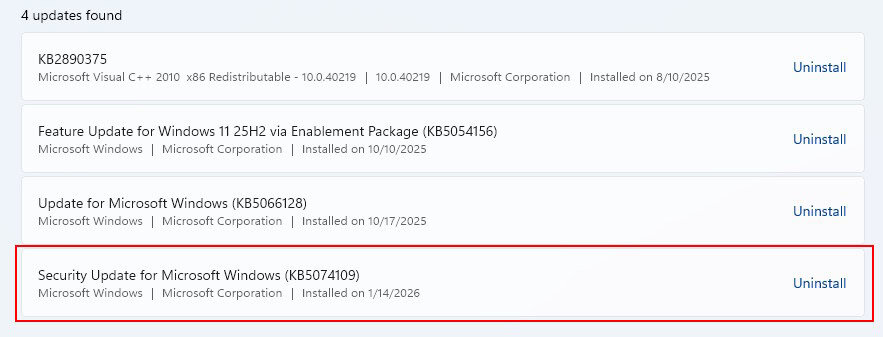
- Microsoft changed the way you can search for updates, however, this the KB5074109 update will be shown, with the option to uninstall it.

- Once the update is uninstalled, your PC will reboot and you’ll get your performance back.