

Close Menu
  • Latest
  • Help Support Independent Journalism
  • Features
  • Hubs
    • Summer Game Fest 2025
    • CES 2026
  • Gaming
    • All Gaming
    • Nintendo
    • PlayStation
    • Xbox
    • PC Gaming
    • Hardware News
    • VR
  • Guides
  • Entertainment
    • All Entertainment
    • Anime & Animation
    • Movies and TV
    • Books
    • Manga & Comics
    • Toys
    • Geek
    • Pop Culture
  • Previews
  • Reviews
    • All Reviews
    • Video Game
    • Anime & Animation
    • Movie & TV
    • Comic Book & Manga
    • Tech & Gear
    • Food
    • Book
    • Toys
    • Tabletop and Card Game
  • Podcasts
    • A-01 Podcast
    • Nintendo Entertainment Podcast
    • Spectator Mode Podcast
  • Contact Us
X (Twitter) YouTube RSS Bluesky Discord

Follow Us

X (Twitter) Instagram YouTube Bluesky Discord
The OuterhavenThe Outerhaven
  • Latest
  • Features
  • Guides
  • Hubs
    • Summer Game Fest 2025
    • CES 2026
  • Previews
  • Reviews
    • Video Game Reviews
    • Anime & Animation Reviews
    • Comic Book & Manga Reviews
    • Films & TV Reviews
    • Hardware Reviews
    • Tabletop & Card Game Reviews
    • Toy Reviews
  • Gaming
    • PlayStation
    • Nintendo
    • Xbox
    • PC Gaming
    • Tabletop & Card Game
    • Hardware News
    • Virtual Reality
  • Entertainment
    • Anime & Animation
    • Comic Books & Manga
    • Films & TV
    • Original English Light Novels DB
    • OELN DB
    • Pop Culture
    • Books
    • Toys
  • Podcasts
    • A-01 Podcast
    • Nintendo Entertainment Podcast
    • Spectator Mode Podcast
The OuterhavenThe Outerhaven
Home»News»Guides»Say Goodbye to Xbox Controller Disconnects on Windows PC with These Simple Fixes

Say Goodbye to Xbox Controller Disconnects on Windows PC with These Simple Fixes

By Keith MitchellMarch 14, 2023
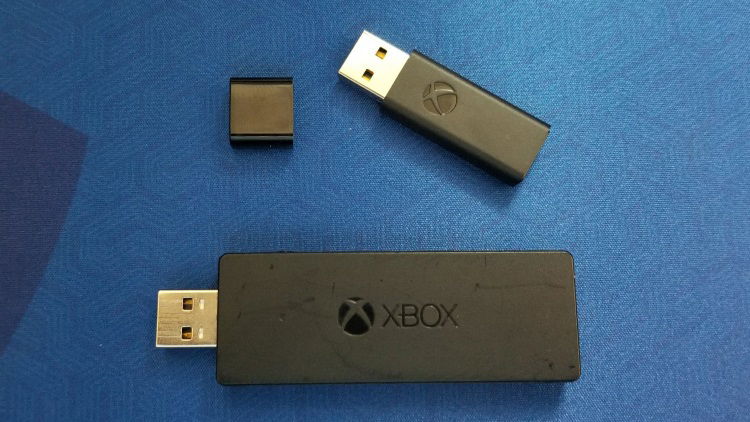
xbox-wireless-adapter-windows10-01

I’ve always had an issue with the Xbox One or Xbox Series controllers when I’ve connected them wireless to my PC, which ran either Windows 8/8.1/10 or, more currently, Windows 11. These controllers were connected using the Xbox Wireless adapter. Whenever I attempted to play with any number of Xbox One or Xbox Series controllers, I would get various Xbox controller disconnects. As you can imagine, dealing with a controller disconnect during a moment of hot and heavy gameplay isn’t idea. Especially if it’s a video game that doesn’t allow you to pause. Yeah, I’m looking at you, Soulsborne games.

Throwing my hands in the air, I decided to figure out what was causing the issue. I mean, I’m an IT professional; I should be able to handle that. Right? Thankfully, after a few moments of head-scratching, I managed to figure it out, and I thought that our loyal readers who might be suffering from the same issue would like to know how to address this.

Lastly, I could have used the Bluetooth connection with the Xbox Series controllers, but Bluetooth introduces lag, which we don’t want when playing games.

These fixes will work for the official Xbox Wireless adapters, the scores of knockoffs, and the 8bitdo Wireless adapters.

Stop the Xbox controller from disconnecting Windows PCs

For these fixes, head to the device manager, which is loaded in the control panel on your Windows PC. If you’re sure how to get there, you can type “device manager” in the search box on the taskbar.

In the device manager, assuming you have the Xbox Wireless adapter plugged in, you’ll see it located in the Network Adapters section. Since it emits and receives a wireless signal, it’s technically a network adapter.
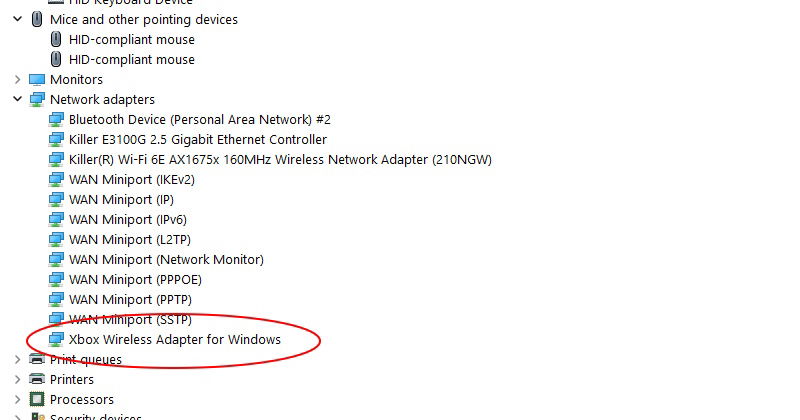
Xbox Wireless Adapter for Windows fix-01

Right-click on the adapter and click on properties.

First up, you’ll see several tabs. Click on the Advanced tab and select “Selective Suspend.” Make sure this is set to “Disable,” If it isn’t, change it to disable. Don’t click “Ok,” or the window will close, and you’ll have to reopen it.
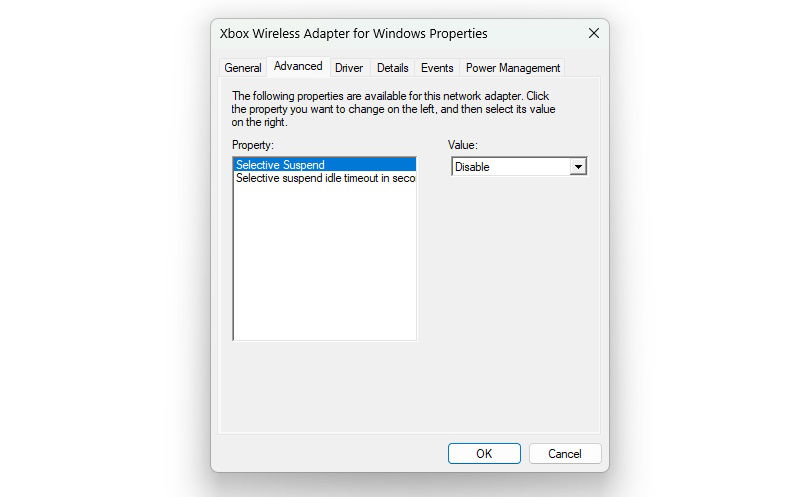
Xbox Wireless Adapter for Windows fix-02

Next, select “Power Management.” Ensure that “Allow the computer to turn off this device to save power” is unchecked. Now you can click on “Ok.”
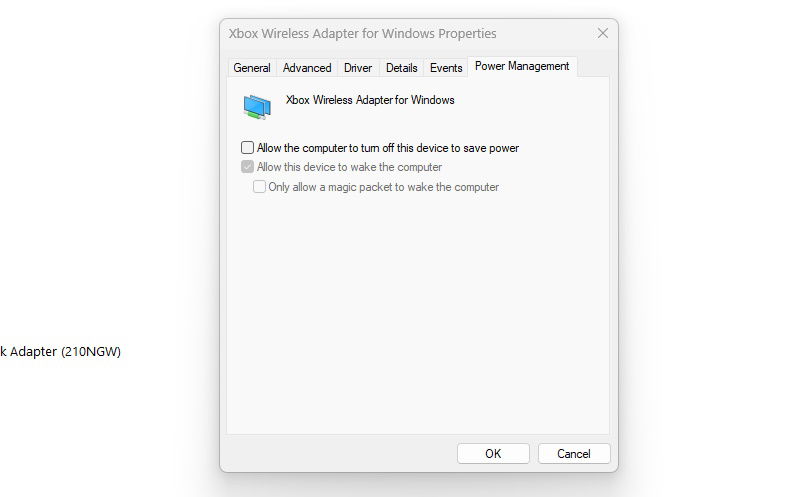
Xbox Wireless Adapter for Windows fix-03

Alright, and we’re done. We’ve ensured that Windows can no longer power off the Xbox Wireless adapter, and yet I’m not sure why these are set as default options. While these were enabled, Windows was powering off the adapter, which caused the controller to disconnect, even during gameplay.

After making these changes, I haven’t experienced a disconnect yet; hopefully, you won’t either.

Windows 10 Windows 11 Windows 8 Xbox Wireless Adapter
Keith Mitchell - Headshot-PS_Gear_400x400
Keith Mitchell
  • X (Twitter)
  • LinkedIn

Keith D. Mitchell is the Founder and Editor-in-Chief of The Outerhaven, covering games and tech for over 14 years. A lifelong PC gamer who began building PCs at age eight, he is a hardware enthusiast, Soulslike devotee, and regular attendee of major gaming and technology events.

Latest Articles

Luna Abyss Demo Impressions: A Bullet Hell FPS That Actually Works

February 15, 2026

Cairn Review – Survive the Climb

February 15, 2026

Comic Review: The Beginning After the End Vol. 10

February 15, 2026
9.0

Anime Review: The Dangers in My Heart: Movie

February 14, 2026

Manga Review: The King’s Beast Vol. 17

February 14, 2026

Manga Review: Rainbows After Storms Vol. 8

February 14, 2026
About Us • Our Team • Contact Us • Privacy Policy • Review Policy
Ethics Policy • Terms of Service • Fact Checking & Corrections Policy • Editorial Policy

Find our reviews on Metacritic • OpenCritic • CriticDB
Copyright @2026 The Outerhaven Productions

Type above and press Enter to search. Press Esc to cancel.