

Close Menu
  • Latest
  • Help Support Independent Journalism
  • Features
  • Hubs
    • Summer Game Fest 2025
    • CES 2026
  • Gaming
    • All Gaming
    • Nintendo
    • PlayStation
    • Xbox
    • PC Gaming
    • Hardware News
    • VR
  • Guides
  • Entertainment
    • All Entertainment
    • Anime & Animation
    • Movies and TV
    • Books
    • Manga & Comics
    • Toys
    • Geek
    • Pop Culture
  • Previews
  • Reviews
    • All Reviews
    • Video Game
    • Anime & Animation
    • Movie & TV
    • Comic Book & Manga
    • Tech & Gear
    • Food
    • Book
    • Toys
    • Tabletop and Card Game
  • Podcasts
    • A-01 Podcast
    • Nintendo Entertainment Podcast
    • Spectator Mode Podcast
  • Contact Us
X (Twitter) YouTube RSS Bluesky Discord

Follow Us

X (Twitter) Instagram YouTube Bluesky Discord
The OuterhavenThe Outerhaven
  • Latest
  • Features
  • Guides
  • Hubs
    • Summer Game Fest 2025
    • CES 2026
  • Previews
  • Reviews
    • Video Game Reviews
    • Anime & Animation Reviews
    • Comic Book & Manga Reviews
    • Films & TV Reviews
    • Hardware Reviews
    • Tabletop & Card Game Reviews
    • Toy Reviews
  • Gaming
    • PlayStation
    • Nintendo
    • Xbox
    • PC Gaming
    • Tabletop & Card Game
    • Hardware News
    • Virtual Reality
  • Entertainment
    • Anime & Animation
    • Comic Books & Manga
    • Films & TV
    • Original English Light Novels DB
    • OELN DB
    • Pop Culture
    • Books
    • Toys
  • Podcasts
    • A-01 Podcast
    • Nintendo Entertainment Podcast
    • Spectator Mode Podcast
The OuterhavenThe Outerhaven
Home»News»Gaming News»Here’s how to fix the incorrect button mappings for Guardians of the Galaxy for Steam

Here’s how to fix the incorrect button mappings for Guardians of the Galaxy for Steam

By Keith MitchellOctober 26, 2021

If you’re playing Marvel’s Guardians of the Galaxy for the PC via Steam, you have noticed that the buttons are working as they should be. The easiest way to describe this is the buttons are reversed. Despite defaulting the buttons in the game, it still doesn’t fix the issue. The problem is that the issue isn’t in the game but within Steam.

Here’s how to fix the issue!

Fix the incorrect button mapping in Steam.

As I mentioned, the button mapping isn’t busted in the game, however, Steam is the culprit. Open up Steam and go to Settings -> Controller -> General Controller Settings.
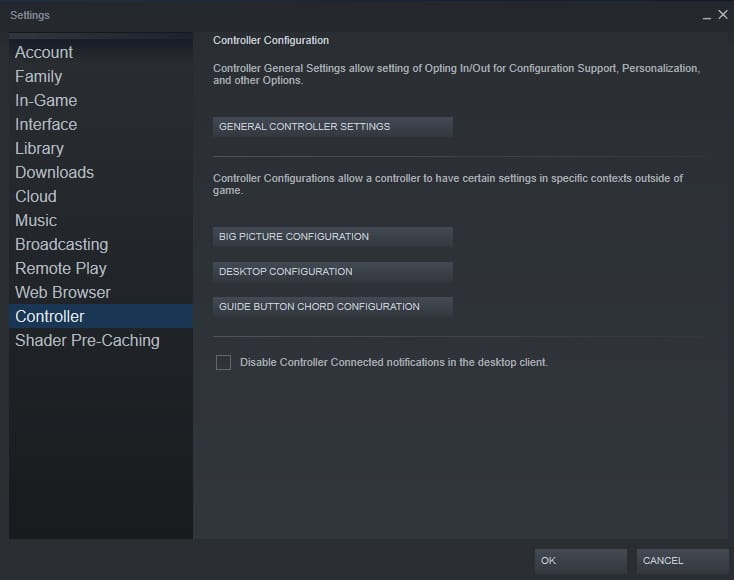
Once in the General Controller Settings menu, check the box next to the controller you are using. Once you do this, this will fix the button mapping in Marvel’s Guardians of the Galaxy. If you also decide to enable Xbox Extended Feature Support, which you don’t need, it will also reset your computer. Keep in that mind.
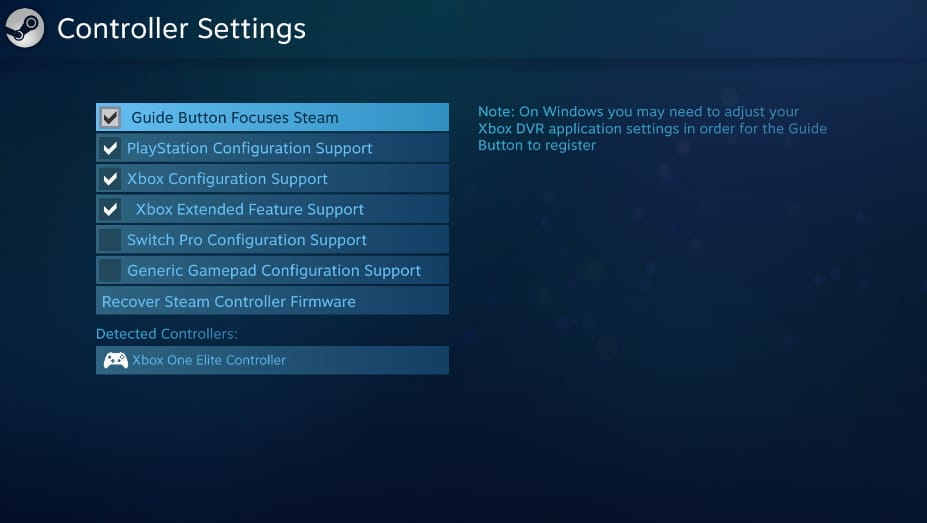
Marvel's Guardians of the Galaxy fix button mapping 2

Now that you have enabled support for the PlayStation Dualshock 3/4 or DualSense controller, Xbox or Xbox Series controller, or Nintendo Switch Pro controller, the button mapping in the game will work properly.

Thanks for checking out our Marvel’s Guardians of the Galaxy guide. Keep an eye out (Not like the one Rocket stole) for more great guides. While you’re here, check out our review of the game.

Check out our other Marvel’s Guardian’s of the Galaxy guides:

  • How To Enable Streaming Mode In Marvel’s Guardians Of The Galaxy
button mapping controller Marvel’s Guardians of the Galaxy steam
Keith Mitchell - Headshot-PS_Gear_400x400
Keith Mitchell
  • X (Twitter)
  • LinkedIn

Keith D. Mitchell is the Founder and Editor-in-Chief of The Outerhaven, covering games and tech for over 14 years. A lifelong PC gamer who began building PCs at age eight, he is a hardware enthusiast, Soulslike devotee, and regular attendee of major gaming and technology events.

Latest Articles

Nioh 3 Guide: Farming Amrita with Spare Weapons In Nioh 3

February 6, 2026

Nioh 3 Guide: Best Control Settings to Make Combat Easier in Nioh 3

February 6, 2026

The Laid-Off Cheat-Granting Mage Enjoys a New Life Receives TV Anime

February 5, 2026

Monster Hunter Stories 3: Twisted Reflection Playable Demo Available on Consoles and PC

February 5, 2026

Granblue Fantasy: Relink Makes Comeback With Endless Ragnarok

February 5, 2026

WWE 2K26 Reveals New Gameplay Footage

February 5, 2026
About Us • Our Team • Contact Us • Privacy Policy • Review Policy
Ethics Policy • Terms of Service • Metacritic • OpenCritic • CriticDB
Ownership & Funding Disclosure • Fact Checking & Corrections Policy • Editorial Policy
Copyright @2026 The Outerhaven Productions

Type above and press Enter to search. Press Esc to cancel.