

Close Menu
  • Latest
  • Help Support Independent Journalism
  • Features
  • Gaming
    • All Gaming
    • Nintendo
    • PlayStation
    • Xbox
    • PC Gaming
    • Card & Tabletop
    • VR
  • Guides
  • Entertainment
    • All Entertainment
    • Anime & Animation
    • Movies and TV
    • Books
    • Manga & Comics
    • Toys
    • Geek
    • Culture
  • Previews
  • Reviews
    • All Reviews
    • Video Game
    • Anime & Animation
    • Movie & TV
    • Comic Book & Manga
    • Tech & Gear
    • Food
    • Book
    • Toys
    • Tabletop and Card Game
  • Podcasts
    • A-01 Podcast
    • Nintendo Entertainment Podcast
    • Spectator Mode Podcast
  • Contact Us
X (Twitter) YouTube RSS Bluesky Discord

Follow Us

X (Twitter) Instagram YouTube Bluesky Discord
The OuterhavenThe Outerhaven
  • Latest
  • Features
  • Guides
  • Previews
  • Reviews
    • Video Game Reviews
    • Anime & Animation Reviews
    • Comic Book & Manga Reviews
    • Films & TV Reviews
    • Tech Reviews
    • Tabletop and Card Game Reviews
    • Toy Reviews
  • Gaming
    • PlayStation
    • Nintendo
    • Xbox
    • PC Gaming
    • Retro Gaming
    • Tabletop
    • Virtual Reality
  • Entertainment
    • Anime & Animation
    • Comic Books & Manga
    • Films & TV
    • Original English Light Novels DB
    • OELN DB
    • Culture
    • Books
    • Toys
  • Tech
  • Podcasts
    • A-01 Podcast
    • Nintendo Entertainment Podcast
    • Spectator Mode Podcast
The OuterhavenThe Outerhaven
Home»News»Gaming News»New Application Plays Background Music off USB Drive for Xbox One

New Application Plays Background Music off USB Drive for Xbox One

By Keith MitchellAugust 4, 2016

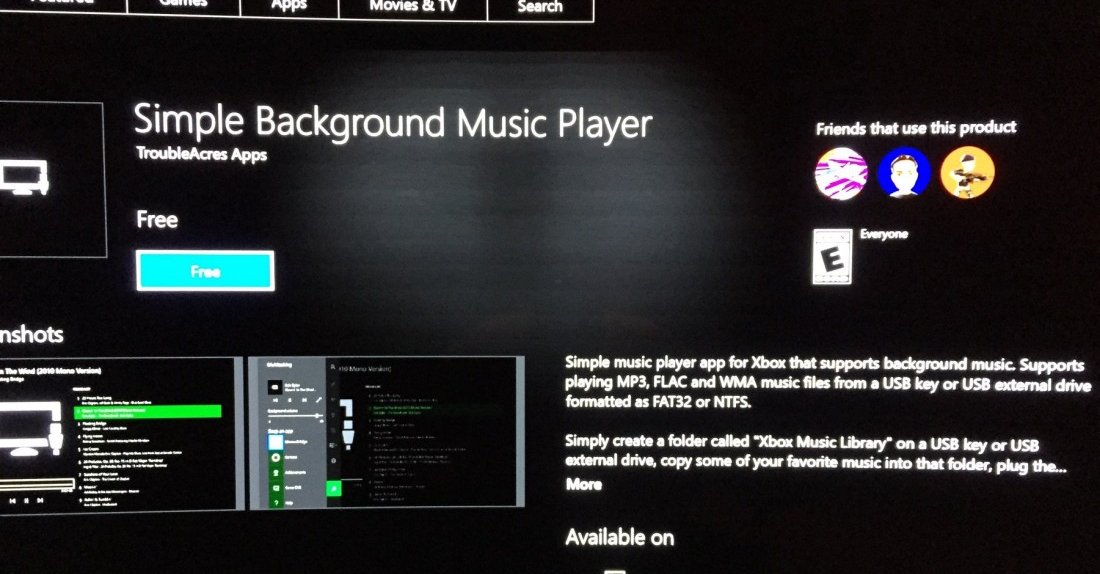
While it isn’t the background music player we’re waiting for, it’s a step in the right direction. Recently today, Mike Ybarra, Director of Program Management for Xbox, tweeted that a Microsoft developer has created an application called “Simple Background Music Player“. What this application does is let you play support music formats MP3, WMA and FLAC via a USB key or external drive.

The drive must be formatted to use NTFS or FAT32, which is simple enough to make happen on any Windows based machine. Sadly, this isn’t the DLNA music background player that we’re hoping does eventually come. The app is currently only available in the North American, United Kingdom, Canada, New Zealand and Australia markets, though more markets will be updated up as the application is localized.

To download the app, fire up your Xbox One, head to the store and search for “Simple Background Music Player“. Make sure that you create a folder on the USB drive called “Xbox Music Library“, otherwise, the Xbox One will not see your music files.

USB background music player is available from one of our devs. Go to Store, Apps, search for background to find. pic.twitter.com/Atlu8O6qp5

— Mike Ybarra 🫡 (@Qwik) August 4, 2016

flac microsoft mp3 SImple Background Music Player WMA XBox one
Keith Mitchell - Headshot-PS_Gear_400x400
Keith Mitchell
  • X (Twitter)
  • LinkedIn

Keith D. Mitchell is the founder and Editor-in-Chief of The Outerhaven, where he has been covering video games and technology for more than 14 years. A lifelong PC gamer, he began building PCs at just eight years old and still loves talking about hardware as much as playing games. His passion for challenging experiences has made him a devoted Soulslike fan, having beaten nearly every FromSoftware release. Keith regularly attends major gaming and technology events to bring firsthand coverage to readers, and continues to enjoy writing about the games and gear that shaped his love for the industry.

Latest Articles

The Best Death Battle Episodes Of The Indie Era

December 14, 2025

Five Ways That The Game Awards Let Me Down This Year

December 14, 2025

Psyren Receives TV Anime

December 14, 2025

Manga Review: Mr. Mega Man Vol. 2

December 14, 2025

AEW Dark Returning One Night For Holiday Season

December 14, 2025

Every Easter Egg We Spotted in the Mega Man: Dual Override Reveal Trailer

December 13, 2025
About Us • Our Team • Contact Us • Privacy Policy • Review Policy
Ethics Policy • Terms of Service • Metacritic • OpenCritic • CriticDB
Ownership & Funding Disclosure • Fact Checking & Corrections Policy • Editorial Policy
Copyright @2025 The Outerhaven Productions

Type above and press Enter to search. Press Esc to cancel.